

Ultimate Guide to TP-LINK EAP625-Outdoor HD AX1800 Access Point
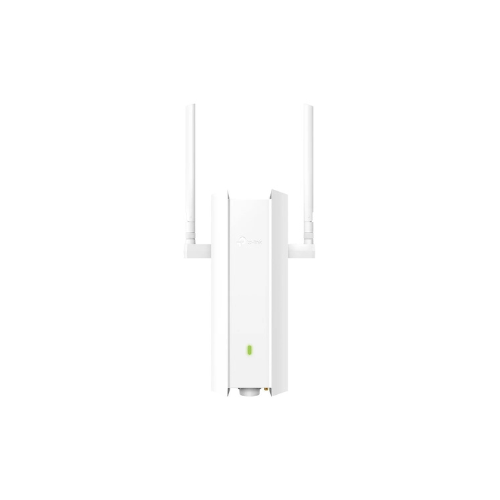
The TP-LINK EAP625-Outdoor HD AX1800 Access Point is a rugged, enterprise-grade outdoor networking unit engineered to deliver crisp wireless coverage, smooth performance, and a modern aesthetic to any property. Featuring a highly versatile high-density architecture, a fluid AX1800 dual-band Wi-Fi 6 speed profile, and an ultra-slim weather-resistant design, this access point fits perfectly into outdoor corporate campuses, open-air restaurant seating, community spaces, and demanding security environments. It offers a high-utility, space-conscious hardware solution that balances everyday performance with exceptional structural durability against the elements.
Key Features and Specifications
This compact exterior networking node balances premium internal antenna mechanics with modern data pacing and environmental protection tools.
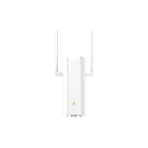
- Versatile Long-Range Coverage Canvas: Offers a high-power structural transceiver system equipped with dedicated smart antennas to blanket expansive outdoor zones without crowding walls.
- Fluid Wi-Fi 6 Interactivity: Delivers ultra-smooth screen scrolling and responsive tracking, completely eliminating typical high-density lag through advanced OFDMA and MU-MIMO multi-device data distribution.
- AX1800 Ultra-High Bandwidth: Renders crisp data pipelines via a rapid 1,800 Mbps aggregate speed rating (1201 Mbps on the 5 GHz band and 574 Mbps on the 2.4 GHz band).
- Vivid Signal Calibration: Leverages specialized Omada Mesh technology to automatically learn your environment and optimize network pathing for a uniform connection across your property.
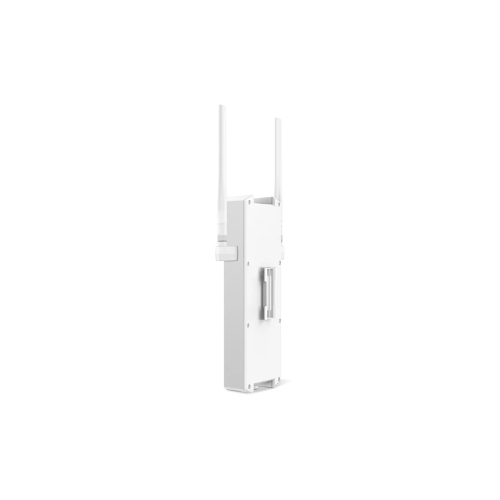
- Ultra-Slim Weather-Resistant Frame: Uses an incredibly thin, IP67-rated dustproof and waterproof chassis layout with integrated lightning protection to support clean exterior deployment.
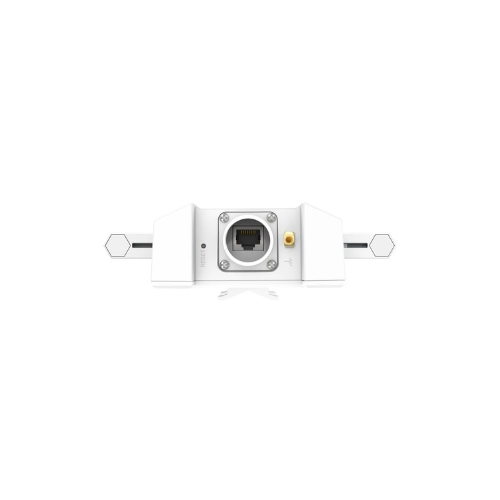
- Multi-Generation Interfaces: Includes a built-in Gigabit PoE+ LAN port to connect modern high-speed switches alongside legacy wired network backbones.
- Integrated Cable Management: Features a tailored physical architecture with a recessed weatherproof connection bay to keep your structural mounts completely free from cord clutter.
- Advanced Cyber Comfort: Certified with robust Omada Software Defined Networking (SDN) tools, incorporating specialized captive portal security and localized WPA3 enterprise encryption to stop harmful threats.
Fluid Everyday Interactivity and Outdoor Space Optimization
The TP-LINK EAP625-Outdoor HD addresses the problem of eye-straining loading loops and choppy video calls common with older outdoor legacy antennas. Toggling between multiple browser tabs, thick data cloud documents, and remote surveillance feeds on standard entry units can cause noticeable connection stutter and physical visual strain due to buffering dropouts during long work blocks.
This model features an upgraded high-density (HD) memory core built to handle massive multi-client pools. The increased data pacing ensures that daily web browsing, document animations, and heavy multi-party virtual meetings render fluidly without ghosting or sudden dropping. Smart roaming rules keep your connection highly uniform as you transition between indoor routers and outdoor zones under a single network name (SSID), making it an excellent platform for reviewing data sheets, building creative presentations, or tracking active asset layouts. [1]
Simplified System Integration and Power Management
The physical hardware architecture focuses on maintaining a minimalist property footprint while supporting versatile remote power configurations.
- Single-Cable Docking Consolidation: The built-in Gigabit port fully supports standardized 802.3at PoE+ or Passive Power over Ethernet inputs, allowing you to stream high-speed data and feed operational power concurrently through a single network line.
- Flexible Mounting Pairing: Houses a multi-functional physical mounting bracket system, allowing you to secure the node cleanly to vertical exterior poles or flat outdoor wall masonry concurrently.
- Smart Omada SDN Centralization: Features specialized cloud-managed pathways that let you parse, distribute, and protect system configurations straight from a centralized dashboard without requiring on-site terminal management.
Quick Physical Setup and Calibration Steps
Assembling and optimizing your outdoor wireless node layout takes only a few quick moments using straightforward mounting paths.
Node Placement and Cable Connection
- Align the structural wall or pole mounting plate carefully against your chosen exterior structural surface and tighten the heavy-duty bolts clockwise by hand.
- Route a high-quality outdoor-shielded Cat6 Ethernet cord through the waterproof rubber sealing grommet on the bottom of the device chassis.
- Click the RJ-45 patch wire firmly into the internal Gigabit PoE+ input slot and slide the weather-tight access door securely back into the casing.
- Slide the access point node downward onto the mounting bracket until it snaps firmly into place, and connect the opposite line end to an active PoE+ switch or power injector.
Initial Network Optimization
- Tap the main network breaker switch on to feed live power out through your Ethernet cabling stream.
- Open your smartphone or web browser to access your localized Omada SDN hardware controller pane or standalone setup application.
- Follow the automated step-by-step graphic prompt commands to name your outdoor network band and set a secure administration password.
- Access the wireless tuning utility pane to adjust signal transmission power or toggle specific captive guest portals depending on your immediate venue task.
Frequently Asked Questions
- Does this access point include a standalone power supply adapter inside the box?
The system is engineered explicitly around streamlined Power over Ethernet deployment and typically relies on a PoE switch or a dedicated passive PoE injector to run. Always check package contents upon ordering, as using a standard non-PoE network line without an intermediary injector will keep the unit completely unpowered. - Can I link this outdoor unit to my network using mesh technology if running wires is impossible?
Yes, the EAP625-Outdoor HD natively supports Omada Mesh capabilities. This permits the node to link to your primary indoor Omada access points completely wirelessly, acting as a high-speed signal repeater to bridge vast outdoor distances without digging physical trenches for cabling. - Is this display panel finish durable enough to survive intense desert heat or seasonal freezing?
The chassis features an advanced, pro-grade industrial outer coating built to survive extreme weather environments. This treatment effectively resists harsh UV fading, heavy rainstorms, and temperature fluctuations ranging from -30°C up to 60°C, ensuring continuous performance over long working hours. - How does the High-Density (HD) architecture affect my workspace compared to standard models?
Its primary system benefit is minimized data lane congestion. Instead of choking up when dozens of smartphones, tablets, and wireless security tools connect simultaneously, the HD processing architecture balances parallel client data streams seamlessly, ensuring your business tools run noticeably smoother and more natural, which significantly lessens operational strain




































Reviews
There are no reviews yet.