



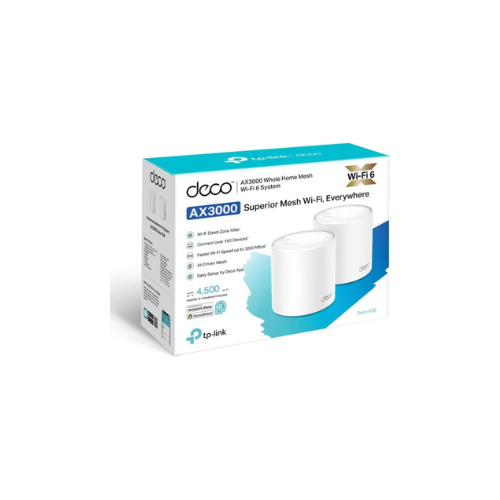
Ultimate Guide to TP-Link Deco X50 AX3000 Whole Home Mesh Wi-Fi 6 System (2 Pack)
The TP-Link Deco X50 AX3000 Whole Home Mesh Wi-Fi 6 System (2 Pack) is a sleek, premium everyday networking solution engineered to deliver crisp wireless coverage, smooth performance, and a modern aesthetic to any room. Featuring a highly versatile dual-node mesh architecture, a fluid AX3000 dual-band Wi-Fi 6 speed profile, and an ultra-slim, compact cylinder design, this system fits perfectly into home offices, large multi-story residences, and corporate smart workspaces. It offers a high-utility, space-conscious hardware solution that balances everyday performance with exceptional network comfort and stability.
Key Features and Specifications
This compact desktop networking array balances premium internal antenna mechanics with modern data pacing and security tools.]
- Versatile 2-Node Coverage Canvas: Offers an optimized structural system capable of blanketing up to 4,500 square feet with seamless wireless signals without crowding furniture surfaces.
- Fluid Wi-Fi 6 Interactivity: Delivers ultra-smooth screen scrolling and responsive tracking, completely eliminating typical lag through advanced OFDMA and MU-MIMO multi-device data distribution.
- AX3000 Ultra-High Bandwidth: Renders crisp data pipelines via a rapid 3,000 Mbps aggregate speed rating (2402 Mbps on the 5 GHz band and 574 Mbps on the 2.4 GHz band).
- Vivid Signal Calibration: Leverages specialized AI-Driven Mesh technology to automatically learn your environment and optimize network pathing for a uniform connection across the home.
- Ultra-Slim Micro-Edge Frame: Uses a clean, modern white chassis layout with no external protruding antennas to support a minimalist layout integration.
- Multi-Generation Interfaces: Includes 3 built-in Gigabit WAN/LAN ports per Deco unit to connect modern smart TVs and high-speed gaming rigs alongside legacy PC towers.
- Integrated Cable Management: Features a tailored structural base with recessed connection channels to keep your desktop completely free from cord clutter.
- Advanced Cyber Comfort: Certified with robust TP-Link HomeShield software, incorporating specialized parental controls and real-time IoT protection to stop harmful threats without distorting true network rendering.
Fluid Everyday Visuals and Seamless Mesh Space Optimization
The TP-Link Deco X50 addresses the problem of eye-straining loading loops and choppy video calls common with older single-router systems. Toggling between multiple browser tabs, thick data cloud documents, and 4K streaming platforms on a standard legacy network can cause noticeable connection stutter and physical visual strain due to buffering dropouts during long work or study blocks.
This model features an upgraded 160 MHz channel bandwidth engine. The increased frame pacing ensures that daily web browsing, document animations, and heavy multi-party virtual meetings render fluidly without ghosting or sudden dropping. Seamless roaming rules keep your connection highly uniform under a single network name (SSID) as you move from room to room, making it a great platform for reviewing detailed spreadsheets, building creative presentations, or managing active data streams
Simplified Smart Integration and Wire Management
The physical hardware architecture focuses on maintaining a minimalist workspace while supporting versatile multi-device device expansion.
- Integrated Cord Consolidation: The clean cylinder body houses localized low-profile power input jacks to channel your primary power bricks away from direct sight.
- Flexible Backhaul Pairing: Houses an integrated Ethernet backhaul mapping system alongside traditional wireless node linkages, allowing you to link your primary fiber box and a secondary remote node concurrently via wall wiring if preferred.
- Massive Device Expansion: Features an optimized memory core built to comfortably support over 150 active smart devices, smart lights, and office terminals concurrently without choking bandwidth lines.
Quick Physical Setup and Calibration Steps
Assembling and optimizing your whole-home mesh network takes only a few quick moments using standard out-of-the-box mobile paths.
Node Placement and Cable Connection
- Place the primary Deco unit upright on a flat, clean table surface close to your main internet service modem.
- Click the provided Ethernet patch cord firmly into any of the three Gigabit ports on the back of the casing and slide the opposite end into your active internet source.
- Plug the low-profile power adapter into the base of the frame and connect the opposite wall plug to your local power supply.
- Position the secondary Deco mesh unit roughly halfway between the main router and your furthest Wi-Fi dead zone, ensuring it stays clear of massive concrete walls.
Initial Network Optimization
- Tap the physical power switch on your wall and look for the visual status LED on the front edge of the Deco frame to pulse blue.
- Open your smartphone and use your localized app marketplace to download the official TP-Link Deco management application.
- Follow the automated step-by-step graphic prompt commands to name your new single network and create a secure administration password.
- Access the built-in HomeShield utility pane to adjust quality of service (QoS) configurations or tap specific device priorities depending on your immediate work task.
Frequently Asked Questions
- Can I mix and match this system with older Deco models if I need to expand?
Yes, the TP-Link Deco X50 features universal family backward compatibility. This permits you to link any existing Deco model variant (such as an older Wi-Fi 5 Deco M4 or E4) into your active network grid seamlessly to expand your overall coverage area. - Do these units feature PoE (Power over Ethernet) support to mount on ceilings?
No, this specific standard desktop Deco X50 variant is built explicitly around standard wall outlet power adapters. If your workspace architecture requires professional drop-ceiling placement or outdoor integration, check out the specialized Deco X50-PoE or Deco X50-Outdoor hardware models instead. - Is this mesh system compatible with all local internet service providers?
The system features an advanced auto-sensing WAN/LAN port layout. This matte treatment effectively parses incoming internet configurations, allowing the mesh kit to work comfortably behind any standard fiber, cable, or DSL modem system out of the box. - How does the AX3000 Wi-Fi 6 standard affect my office work compared to standard Wi-Fi 5 routers?
Its primary office benefit is minimized data lane congestion. Instead of devices fighting sequentially for network access, the Wi-Fi 6 architecture splits data streams into smooth parallel lanes, ensuring your smart home appliances, backup drives, and work computers run noticeably smoother and more natural, which significantly lessens operational strain over long working hours.




































Reviews
There are no reviews yet.