

Ultimate Guide to TP-Link Deco X50 AX3000 Whole Home Mesh Wi-Fi 6 System (3-Pack)
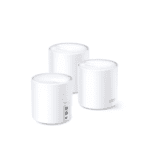
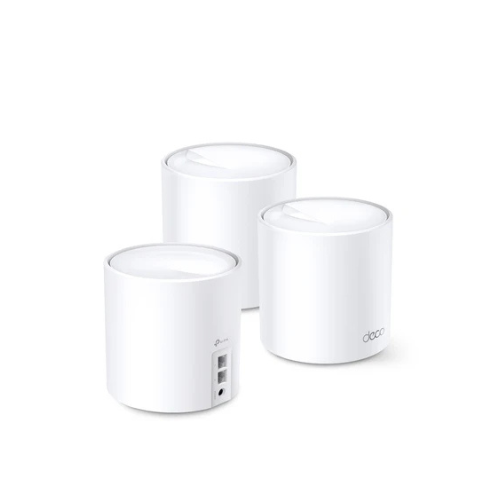
The TP-Link Deco X50 is an advanced whole-home mesh Wi-Fi 6 system designed to eliminate dead zones and provide seamless, ultra-fast connectivity across large properties. Operating on the high-performance AX3000 standard, this 3-pack system blankets multi-story homes in a unified wireless footprint. It delivers a high-capacity, low-latency internet backbone ideal for data-heavy tasks like 4K streaming, VR gaming, smart home automation, and intensive remote work.
Key Features and Specifications
This mesh system integrates next-generation wireless engineering with robust physical connectivity options.
-
- Wi-Fi 6 Technology: Employs the latest wireless standard for greater network capacity, efficiency, and speed.
- 3000Mbps Combined Speeds: Delivers up to 2402Mbps on the 5GHz band and 574Mbps on the 2.4GHz band.
- AI-Driven Mesh: Learns your network environment automatically to provide customized Wi-Fi tailored to your home layout.
- Three Gigabit Ports Per Node: Features three automatic-sensing Gigabit WAN/LAN ports on every single unit to eliminate port bottlenecks.
- 160MHz Channel Support: Doubles the standard channel bandwidth to accelerate wireless data transfer speeds.
- Connects Up To 150 Devices: Utilizes advanced multi-user communication tools to handle massive smart home accessory loads smoothly.
- TP-Link HomeShield: Provides robust built-in network protection, advanced parental controls, and real-time IoT security.
Intelligent Coverage and Wall Penetration
The Deco X50 3-pack solves the problem of structural signal degradation across expansive residential floor plans. Standard single routers struggle to push signals through concrete walls and across separate floors, leading to severe drop-offs.
This system uses a dynamic mesh array to cover spaces up to 6500 square feet. Equipped with advanced AI-Driven Mesh technology, the nodes talk to each other constantly. The system analyzes local signal quality and user habits to optimize data paths, ensuring your wireless stream remains fast and unbroken even in the furthest corners of your home.
Seamless Roaming and Multi-User Efficiency
The core strength of this system is its unified network design.
-
- True Seamless Roaming: Binds all units under a single Wi-Fi name and password so your mobile devices shift smoothly to the nearest node without dropping out.
- OFDMA and MU-MIMO Technology: Divides wireless channels into smaller slices to let the system talk to dozens of smartphones, laptops, and smart TVs simultaneously.
Step-by-Step Mobile App Setup Guide
Setting up your whole-home mesh architecture requires zero technical background using the centralized mobile app.
Initial Configuration Process
-
- Download the official TP-Link Deco app onto your smartphone or tablet device.
- Unplug your internet provider modem from its power outlet and remove its backup battery if it has one.
- Connect one Deco node directly to your modem network port using the packaged Ethernet cable.
- Power on both your internet modem and the connected Deco unit, waiting for the Deco LED indicator light to flash blue.
- Open the app, log into your TP-Link ID profile, and follow the step-by-step visual on-screen prompts.
- Define your new network properties by choosing a custom Wi-Fi name and a strong security phrase.
Deploying Additional Mesh Nodes
-
- Power on the remaining Deco nodes one at a time in open rooms halfway between the main node and your dead zones.
- Wait for the additional units to be found automatically by the app layout.
- Confirm the final LED status indicators turn solid green, signaling a strong, healthy link between all network points.
Frequently Asked Questions
Can the TP-Link Deco X50 work with my existing older routers?
Yes, the mesh system is fully backward compatible. It connects with hardware using older wireless standards like Wi-Fi 5 and works with any internet service provider modem, though you should disable your old modem built-in Wi-Fi to prevent interference.
What is the advantage of the three Gigabit ports on each node?
Unlike basic mesh points that offer only one or two ports, every single Deco X50 unit houses three Gigabit ports. This lets you run fast, reliable wired connections directly to stationary hardware like smart TVs, desktop computers, or storage drives in any room.
How does HomeShield protect my connected smart home devices?
HomeShield uses real-time network scanning to identify potential security holes, block malicious websites, and isolate compromised IoT devices. It acts as an internal shield to keep hackers from accessing your personal data through smart cameras or appliances.
Can I expand this mesh network further in the future?
Yes, you can easily expand your network coverage at any time. All models in the TP-Link Deco family can be mixed and matched together, allowing you to add extra Deco units whenever your space or device needs grow




































Reviews
There are no reviews yet.