


Ultimate Review of TP-Link Archer BE230 BE3600 Dual Band Wi-Fi 7 Router
The TP-Link Archer BE230 stands as a premier entry point into the next generation of wireless networking by bringing advanced Wi-Fi 7 capabilities to mainstream consumers and home offices. Carrying a BE3600 performance classification, this dual-band router is engineered to eliminate local wireless congestion, reduce latency, and provide a future-proof foundation for high-speed multi-gigabit internet plans. Here is a complete analysis of this hardware asset to help optimize your home or small business network.
Key Hardware Specifications
This Wi-Fi 7 gateway is built with high-performance physical interfaces designed to match its ultra-fast wireless throughput capabilities
- Wireless Standard: IEEE 802.11be Wi-Fi 7 with complete backwards compatibility for older devices.
- Maximum Data Rate: Combined concurrent wireless speeds reaching up to 3600 Mbps.
- Band Allocation: Sub-divided into 2880 Mbps on the 5 GHz band and 688 Mbps on the 2.4 GHz band.
- Multi-Gigabit WAN: One dedicated 2.5 Gbps WAN port to support high-speed fiber internet tiers.
- Multi-Gigabit LAN: One dedicated 2.5 Gbps LAN port for ultra-fast wired client connections.
- Standard LAN Ports: Three 10/100/1000 Mbps Gigabit Ethernet ports for traditional wired devices.
- Storage Interface: One built-in USB 3.0 port for network-attached storage or private cloud creation.
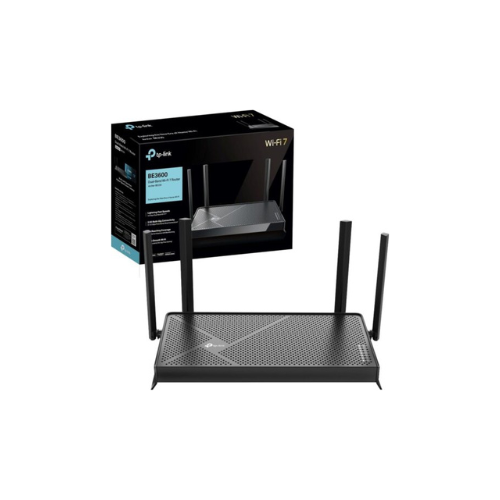
- Antenna Design: Four external high-gain antennas positioned for optimal multi-directional coverage.
Wi-Fi 7 Architecture and Wireless Efficiency
The defining advancement of the Archer BE230 is its integration of the Wi-Fi 7 standard, which fundamentally re-engineers how wireless data is processed and transmitted.
Multi-Link Operation Technology
Traditional dual-band routers force client hardware to choose between the 2.4 GHz and 5 GHz bands independently. This router utilizes Multi-Link Operation, allowing compatible Wi-Fi 7 devices to connect to both bands simultaneously. By bonding these two frequencies together, the router achieves massive throughput gains, drastically drops latency, and ensures data transmission continues uninterrupted even if one band experiences heavy interference.
4K-QAM Advanced Modulation
Data density is significantly expanded through the implementation of 4K-QAM technology. By packing data symbols tighter into the transmission waves, this advanced modulation scheme allows the router to transmit 20 percent more data at a time compared to the older Wi-Fi 6 standard, making 4K and 8K streaming incredibly smooth.
Multi-RUs and Preamble Puncturing
Older wireless standards would block an entire Wi-Fi channel if a small portion of it suffered from local interference. With Preamble Puncturing and Multi-RUs, the Archer BE230 slices out only the interfered portion of the frequency band, allowing the remaining clean channel space to transmit data freely instead of wasting available bandwidth.
Ideal Deployment Use Cases
High-Speed Fiber Homes
The 2.5 Gbps WAN port ensures that users paying for ultra-fast fiber internet plans receive their full, unrestricted bandwidth directly into their home routing environment.
Low-Latency Online Gaming
Gamers can connect consoles or custom rigs to the 2.5 Gbps LAN port or use Multi-Link Operation to eliminate ping spikes and jitter during competitive matches.
Local Media and Cloud Storage Hubs
Connecting an external hard drive to the high-speed USB 3.0 port allows family members to backup photos, stream local videos, and share office files across the network.
Centralized Control and Smart Security Ecosystem
Network administration is simplified through a visual interface accessible via any standard web browser or the TP-Link Tether mobile application.
The router features automated setup procedures, allowing users to scan a QR code to configure their network credentials within minutes. The software platform supports advanced WPA3 wireless encryption layers to keep unauthorized devices off the network.
The system includes TP-Link HomeShield, a built-in security suite that provides real-time network scanning, IoT device protection, robust parental control filters, and comprehensive data scheduling tools to promote healthy screen habits. Furthermore, EasyMesh compatibility allows the router to pair with other compliant extenders to create a single, seamless mesh network across large properties.
Physical Placement and Thermal Optimization
The chassis features a sleek, low-profile horizontal design with stylized venting across the top panel to promote natural convective airflow. For maximum coverage, the four high-gain external antennas should be spread apart rather than clustered together.
Place the router in a central, elevated location—such as a shelf or media console—instead of hiding it inside a closed cabinet. This placement prevents walls and furniture from absorbing the radio signals, ensuring the high-frequency 5 GHz band maintains maximum signal strength to the edges of your home




































Reviews
There are no reviews yet.