

Ultimate Guide to D-Link DKVM-CB 1M Cable Kit for DKVM Products
The D-Link DKVM-CB is a premium 1-meter KVM keyboard, video, and mouse cable kit engineered specifically to connect computers to your compatible D-Link DKVM switches. By consolidating multiple hardware connections into a single streamlined cord, this industrial-grade cable kit eliminates server room clutter, optimizes workstation organization, and maintains flawless signal integrity. It serves as an essential accessory for system administrators, IT professionals, and home lab enthusiasts who manage multi-computer environments.
Key Features and Specifications
This cable kit blends durable structural design with high-quality shielding to ensure continuous hardware performance.
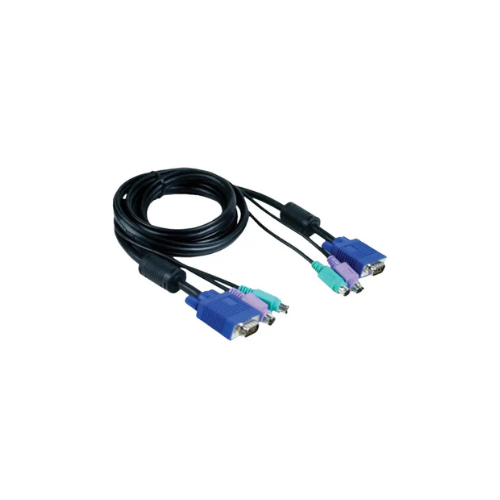
- All-In-One Form Factor: Combines video cables and device control lines into a single bonded cable jacket.
- 1-Meter Optimal Length: Provides the perfect span for neat rack layouts, desktop setups, and close-proximity server connections.
- VGA Video Support: Features standard 15-pin Male-to-Male HDB connectors to deliver crisp display resolutions without ghosting.
- PS2 Peripheral Connectivity: Includes color-coded 6-pin mini-DIN connectors for legacy keyboard and mouse routing.
- Heavy-Duty Shielding: Utilizes built-in ferrite cores and extensive protective layers to block electromagnetic and radio frequency interference.
- Thumb-Screw Fasteners: Ensures secure physical connections that prevent accidental data disconnects or signal loss.
- Universal DKVM Compatibility: Pairs perfectly with the entire line of D-Link legacy mechanical and electronic console switches.
Streamlined Workstation and Rack Management
The DKVM-CB solves the common problem of cable clutter behind server racks and multi-PC desks. Standard setups require tracking three separate cables per computer, which often tangle, restrict airflow, and complicate troubleshooting.
This specialized kit binds the VGA display cable and two PS2 data lines inside a single thick, flexible protective sleeve. This layout makes managing your cables simple, maximizes back-panel airflow, and keeps server environments safe from accidental snags.
Signal Preservation and Hardware Durability
The construction of this cable focuses heavily on maintaining zero data degradation during continuous operation. The video strand features double-shielding and premium core wiring to prevent screen flickering, color distortion, or resolution drops when switching active systems.
The integrated physical connectors are built for longevity. Color-coded ends—purple for keyboards and green for mice—follow global IT industry standards to allow rapid, error-free identification during hectic installation procedures.
Quick Installation and Integration Steps
Integrating this cable kit into your existing hardware layout takes only a few moments.
Connecting to the KVM Switch
- Identify the dedicated PC port bank on the back of your D-Link KVM switch.
- Plug the primary VGA connector end of the cable into the switch video port.
- Tighten the integrated thumb-screws clockwise by hand to lock the video connection in place.
- Insert the green and purple PS2 connectors into their matching color slots on the switch.
Connecting to the Target Computer
- Extend the opposite end of the cable kit directly to your target computer tower or server tray.
- Attach the 15-pin VGA connector to the computer graphic card output port.
- Plug the purple PS2 line into the computer physical keyboard port.
- Plug the green PS2 line into the adjacent computer physical mouse port.
Frequently Asked Questions
While specifically engineered and pinned for D-Link DKVM systems, the cable uses standard analog VGA and PS2 pin configurations. It can often function with other legacy switches that utilize standard separated port designs.
Does the D-Link DKVM-CB support USB keyboard and mouse connections?
No, this specific model is designed for legacy PS2 peripheral interfaces using 6-pin mini-DIN connectors. If your target computer only features USB ports, you will need a separate active adapter or a USB-specific KVM cable kit.
How do the ferrite cores benefit my display quality?
The molded ferrite cores act as passive electrical filters. They suppress high-frequency electronic noise generated by nearby power supplies or server fans, keeping your analog monitor display sharp and clear.
Is the 1-meter length sufficient for deep server enclosures?
A 1-meter length is perfect for connecting servers that reside within the same rack drawer or sit directly adjacent to the switch box. For larger spans or across separate server cabinets, longer cable versions are highly recommended.




































Reviews
There are no reviews yet.