

Ultimate Guide to D-Link AC1200 Dual Band Wi-Fi 5 Range Extender DAP-1610
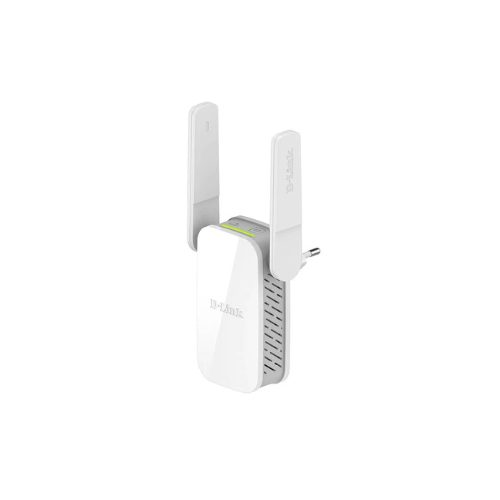
The D-Link DAP-1610 is a wall-plug wireless repeater designed to expand your existing network footprint and eliminate household Wi-Fi dead zones. Operating on the dependable Wi-Fi 5 standard, this dual-band range extender captures weak signals from your primary router and rebroadcasts them. It provides an affordable and efficient solution to extend internet coverage to hard-to-reach areas like basements, patios, or upper floors.
Key Features and Specifications
This compact plug-in device combines dual-band transmission with simple visual aids for optimal placement.
- AC1200 Wireless Class: Rebroadcasts high-speed data at a combined rate of up to 1200Mbps.
- Dual-Band Operation: Delivers up to 867Mbps on the 5GHz band and 300Mbps on the 2.4GHz band.
- Smart Signal Indicator: Uses built-in LED lights to help you find the absolute best location for maximum coverage.
- One-Touch WPS Configuration: Connects securely to your existing router with the press of a physical button.
- Fast Ethernet Port: Connects wired hardware devices or converts the extender into a local wireless hotspot.
- External Fold-Out Antennas: Adjusts easily to maximize signal reception and stabilize wireless performance.
- Universal Compatibility: Pairs seamlessly with any brand of wireless router or internet service provider gateway.
Intelligent Signal Detection and Dual-Band Efficiency
The DAP-1610 solves coverage problems by using smart physical feedback. The integrated Smart Signal Indicator LEDs remove the guesswork from installation. A clear visual display warns you if the extender is placed too close or too far from your primary router, ensuring you lock in the strongest possible relay signal.
Once positioned, the device manages traffic efficiently by using two distinct wireless bands. It routes low-bandwidth background tasks through the far-reaching 2.4GHz band. High-demand traffic, such as high-definition streaming or video conferencing, is automatically assigned to the interference-free 5GHz band to prevent stuttering.
Versatile Application Modes
The hardware includes a multi-mode switch system to fulfill different home networking needs.
- Range Extender Mode: Captures your current router signal wirelessly and projects it deeper into your home.
- Access Point Mode: Connects to an existing wall jack via an Ethernet cable to create a fresh Wi-Fi hotspot.
Quick Installation and Syncing Methods
Activating your extended wireless network requires zero technical experience and can be completed in minutes.
One-Touch WPS Setup
- Plug the extender into an electrical outlet located near your primary wireless router.
- Press the physical WPS button on your main router.
- Press the WPS button on the DAP-1610 within two minutes to secure the automatic digital handshake.
- Move the extender to its permanent location halfway between your router and the dead zone once the connection LED turns solid.
D-Link Mobile App Setup
- Download the D-Link Wi-Fi mobile application onto your smartphone or tablet.
- Plug in the device and wait for the status LED light to flash amber.
- Open the application and follow the step-by-step visual configuration instructions to link the extender to your home network.
Frequently Asked Questions
Can I connect a desktop computer directly to the D-Link DAP-1610?
Yes, the device features a fast Ethernet port on its base. This allows you to run a physical network cable directly to stationary devices like smart TVs, desktop computers, or gaming consoles for a stable connection.
Will this extender slow down my overall internet speed?
All wireless range extenders experience some speed reduction because they must receive and retransmit data simultaneously. Using the high-speed 5GHz band helps minimize this performance dip, keeping your connection smooth.
What should I do if the Smart Signal Indicator turns red?
A red light indicates that the extender is too far away from your primary router to capture a stable wireless feed. Unplug the device and move it to an outlet closer to the main router until the light turns solid green.
Does the DAP-1610 support the same Wi-Fi name as my router?
Yes, during the initial software setup process, you can choose to clone your existing network name and password. This allows your mobile devices to roam smoothly between the router and extender.




































Reviews
There are no reviews yet.