
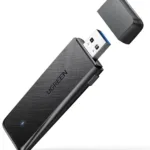

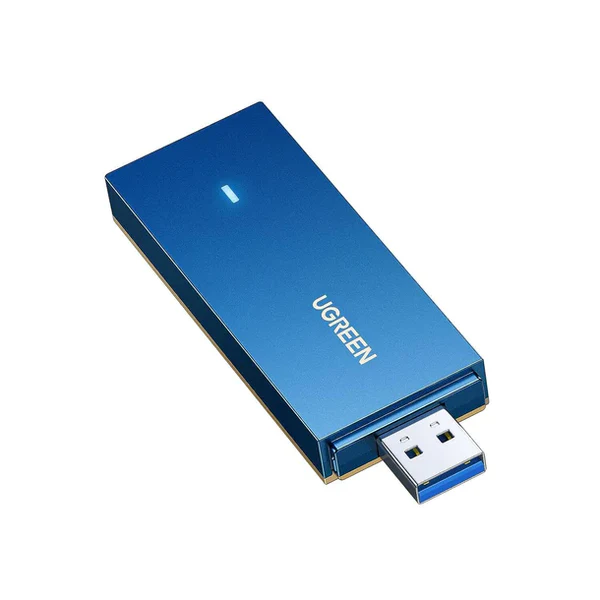
Ugreen CM499 AX1800 Dual-Band Wireless USB Adapter (Wi-Fi 6)
Key Features
Model: UGREEN CM499
Equipped with OFDMA and 1024QAM technology
faster transmission speed
wider coverage, and stronger stability
supports both 5GHz – up to 1201Mbps and 2.4GHz bands
download a large amount of data in an instant
Beamforming and MIMO technology
has built-in drivers for Windows 11/10
latest WPA3 security protocol
Ultimate Guide to Ugreen CM499 AX1800 Dual-Band Wireless USB Adapter
The Ugreen CM499 is a high-speed wireless network adapter designed to upgrade laptops and desktop computers to modern Wi-Fi 6 performance. Operating on the AX1800 hardware standard, this dual-band USB dongle delivers fast data throughput and minimizes network latency. It provides a highly efficient and portable solution to replace slow internal network cards or expand connectivity for online gaming, high-definition streaming, and virtual meetings.
Key Features and Specifications
This high-performance adapter combines advanced wireless processing with a fast data interface inside a durable frame.
- Wi-Fi 6 Engineering: Employs the latest network standards to boost data efficiency and overall system capacity.
- AX1800 Dual-Band Speeds: Achieves combined transmission rates up to 1201Mbps on the 5GHz band and 574Mbps on the 2.4GHz band.
- USB 3.0 Interface: Provides data transfer speeds up to 10 times faster than older USB 2.0 connections to eliminate hardware bottlenecks.
- Advanced WPA3 Security: Deploys the newest wireless encryption protocols to protect your network passwords from external threats.
- MU-MIMO Architecture: Establishes multiple simultaneous data streams to improve network throughput when paired with compatible routers.
- OFDMA Technology: Divides wireless channels into smaller allocations to significantly reduce data queuing and device latency.
- Integrated Antennas: Features built-in high-gain antennas to optimize signal tracking while maintaining a clean profile.
High-Speed Dual-Band Connectivity and USB 3.0 Advantage
The Ugreen CM499 eliminates common network slowdowns by pairing dual-band technology with a high-speed USB 3.0 port. Users can assign data-heavy online tasks like video conferencing and 4K media streaming to the clearer 5GHz band. For standard webpage browsing, background file downloads, and smart home accessory management, the far-reaching 2.4GHz band provides steady coverage.
The inclusion of a USB 3.0 interface ensures the adapter can handle these high wireless speeds. Older USB 2.0 ports cap transfer rates, but the upgraded USB 3.0 standard allows data to flow freely between your computer motherboard and the adapter without hardware lag.
Improved Efficiency via Wi-Fi 6 Optimizations
By transitioning to Wi-Fi 6 protocols, the adapter handles dense residential and commercial wireless environments smoothly. Technologies like OFDMA partition the active channel space into smaller chunks, allowing your computer to transmit information packets faster without waiting for other household devices to finish their cycles. Combined with MU-MIMO, it allows compatible routers to communicate with the adapter simultaneously, sustaining reliable download streams even when the household network is busy.
Driver Installation and Deployment Steps
Bringing your target machine online takes only a few quick moments using standard installation procedures.
Driver Setup Process
- Insert the adapter into an available USB 3.0 slot on your computer tower or laptop frame.
- Download the latest official drivers from the Ugreen support website using an existing internet link.
- Launch the setup installation program as an administrator on your operating system.
- Follow the quick onscreen prompts to complete the quick installation wizard.
- Restart your computer if prompted by the setup software to finalize the new hardware configurations.
Connecting to the Network
- Click on the wireless network icon located within your system taskbar.
- Select your local router network identifier from the populated list of available Wi-Fi names.
- Input the corresponding password credentials to authenticate your connection and access the internet.
Frequently Asked Questions
Can the Ugreen CM499 fit into a standard USB 2.0 port?
Yes, the adapter is fully backward compatible with older USB 2.0 slots. However, using a USB 2.0 port will restrict the maximum transmission speed, so plugging it into a blue USB 3.0 port is highly recommended for best performance.
Which operating systems are officially compatible with this adapter?
The hardware provides dedicated driver support for modern Windows operating systems, including Windows 11 and Windows 10. You should check the official manufacture site for up-to-date compatibility regarding Linux distributions.
Does this USB network adapter require a separate power cord?
No, the device draws all its operational power directly through the computer USB port. It utilizes an energy-efficient chip design to ensure it does not drain laptop batteries excessively during mobile use.
Do I need to disable my laptop’s built-in Wi-Fi to use this device?
Yes, disabling your computer’s built-in legacy wireless card via the Device Manager interface is highly recommended. This prevents internal hardware address conflicts and ensures your operating system prioritizes the faster Ugreen adapter.




































Reviews
There are no reviews yet.