

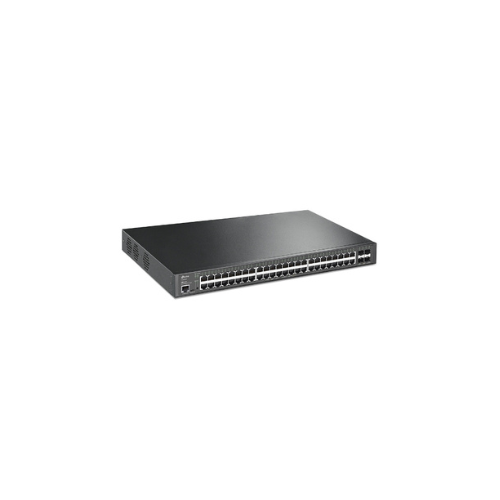
TP-Link TL-SG3452XP 48-Port 10/100/1000Mbps JetStream Gigabit L2+ Managed Switch with 48-Port PoE+ and 4-Port 10GE SFP+ Slots
Key Features
Brand:TP-Link
Omada SDN centralized management
Cloud-based remote monitoring
Advanced L2+ features (VLAN, QoS, ACL)
Static routing support
IGMP Snooping for multicast optimization
Traffic prioritization for voice/video
Auto device discovery and provisioning
Network health monitoring tools
FAST DELIVERY
TP-Link JetStream TL-SG3452XP 48-Port PoE+ Managed Switch Technical Guide
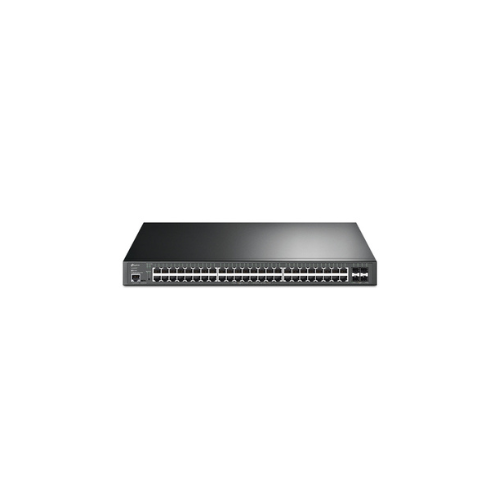
The TP-Link JetStream TL-SG3452XP is an enterprise-grade, high-density 48-port Gigabit L2+ managed switch engineered for core distribution networks, corporate office infrastructure, IP surveillance matrices, and high-performance wireless access networks. Combining a robust Power over Ethernet (PoE+) budget, high-speed 10G SFP+ uplink fiber ports, and the Omada Software Defined Networking (SDN) centralized management system, this 1U rackmount switch optimizes network orchestration and uptime. This comprehensive guide covers key product features, core technical specifications, and system installation steps.
The TP-Link TL-SG3452XP operates as a resilient aggregation hub designed to ensure zero-packet drop rates under peak traffic conditions. Utilizing advanced static routing and access control defense layers, the switch secures sensitive data pathways while supplying localized power directly to network endpoints. For a detailed performance structural breakdown and troubleshooting configuration, review the full guide below
Premium Design and Key Features
Centralized Omada SDN Cloud Integration
The switch incorporates native integration into the TP-Link Omada Software Defined Networking ecosystem. Network administrators can leverage a centralized hardware, software, or cloud-based controller dashboard to provision configuration changes seamlessly across multiple branches, trace absolute port activity timelines, view bandwidth bottlenecks, and monitor real-time power metrics without running direct command-line utility configurations.
48-Port PoE+ Array with a Massive 500W Power Budget
The primary hardware data interface features 48 continuous Gigabit Ethernet ports that support IEEE 802.3at/af PoE+ standard compliance. This infrastructure can deliver up to 30W of power independently per individual port, drawing from a high-capacity 500 Watt total power budget. This enables installers to deploy an expansive matrix of power-hungry terminal equipment—such as dual-band Wi-Fi 7/6 access points, panning security cameras, and enterprise VoIP video desk phones—using single Ethernet cabling drops.
High-Speed 10G SFP+ Fiber Uplink Architecture
To completely eliminate traffic choke points between floor levels or data racks, the hardware includes four dedicated 10G SFP+ fiber expansion slots. These high-speed ports provide ultra-wide throughput to act as a trunk line directly back to your central core servers or main network gateway routers, guaranteeing ultra-low-latency data transport for high-bandwidth corporate applications and backups.
Advanced L2+ Routing and Security Access Lists
Equipped with robust L2+ feature logic, the switch optimizes physical routing within your internal corporate network. It handles static routing tasks natively to offload processing cycles from your main firewall gateway router. This pairs with Access Control Lists (ACL), IP-MAC-Port Binding scripts, 802.1X enterprise authentication protocols, and localized DHCP Snooping to lock out unauthorized intruders or rogue access nodes immediately.
Technical Specifications
- Model Identification: TP-Link JetStream TL-SG3452XP
- Port Arrangement: 48 x 10/100/1000 Mbps RJ-45 PoE+ Ports, 4 x 10G SFP+ Fiber Slots
- Power over Ethernet Capacity: IEEE 802.3at/af compliant (Ports 1–48)
- Total Energy Pool Budget: 500 Watts maximum simultaneous PoE power delivery
- Switching Architecture Fabric: 176 Gbps total internal bidirectional throughput path
- Packet Forwarding Rate: 130.95 Million Packets Per Second (Mpps) processing capability
- MAC Address Memory Capacity: 16K entries with automated learning and aging scripts
- Packet Buffer / Jumbo Frame: 12 Mbit internal packet buffer frame; supports up to 9 KB Jumbo frames
- Layer 3 Capabilities: Static Routing (up to 48 routes), DHCP Server, DHCP Relay
- Chassis Engineering Profile: 1U 19-Inch Rackmount Form Factor with internal intelligent speed-controlled cooling fans
Step-by-Step Initial Setup Guide
Mechanical Rack Mounting and Interconnection
- Position the switch chassis onto a clean workspace surface and line up the included heavy-duty rack ears with the side mounting screw holes.
- Fasten the retention screws securely to mount the ears, then slide the switch horizontally into an open 1U slot in your 19-inch cabinet cage.
- Tighten the four front structural panel screws directly to your rack rails to firmly hold the weight of the chassis.
- Plug a high-speed fiber patch cord equipped with an authorized 10G SFP+ transceiver module into SFP+ Port 49 or 50, routing the opposite end to your gateway firewall or core enterprise router.
- Insert your corporate terminal IP surveillance cameras, Wi-Fi access points, or office computing nodes into RJ-45 Ports 1 through 48.
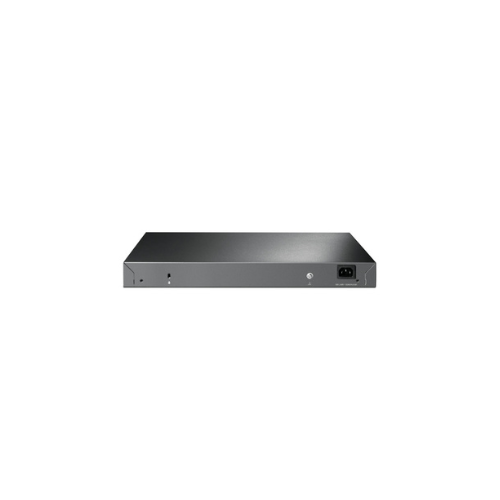
- Attach the included heavy-duty three-prong AC power cord into the rear input interface socket, and connect it to a grounded server room power distribution unit (PDU) to boot up.




































Reviews
There are no reviews yet.