

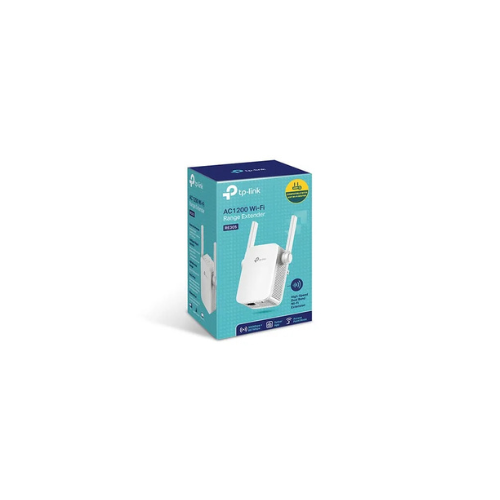
Tp-link RE305 AC1200 Wi-Fi Range Extender
The TP-Link RE305 AC1200 Wi-Fi Range Extender is a compact, wall-plug signal booster engineered to eliminate wireless dead zones and expand network coverage across residential and small office environments. This hardware overcomes structural signal blockages by capturing existing router signals and rebroadcasting them at dual-band speeds. Homeowners looking to fix weak signals in upstairs bedrooms, basements, or garages can deploy this device to sustain stable connections for multiple household clients simultaneously
Search Details
- Primary Keyword Phrase: TP-Link RE305
- Page Title: TP-Link RE305 AC1200 Wi-Fi Range Extender Specs and Review
- Snippet Text Summary: Review the TP-Link RE305 range extender. Discover its AC1200 dual-band speeds, smart signal indicators, and built-in access point mode capabilities.
Dual-Band AC1200 High Speed Performance
The hardware utilizes concurrent wireless bands to achieve a combined data rate of up to 1200Mbps. It splits network traffic across two operational channels to minimize congestion and prevent connection drops
- 5GHz Band: Provides up to 867Mbps for bandwidth-heavy operations like high-definition online streaming, gaming, and video calls.
- 2.4GHz Band: Delivers up to 300Mbps to support basic web browsing, email updates, and legacy smart home devices.
The exterior chassis features two external antennas that stabilize signal reception, ensuring broad coverage and deep wall penetration throughout the property.
Smart Placement and Physical Interface
Finding the ideal location between the master router and the dead zone is simplified by built-in hardware sensors:
- Intelligent Signal Indicator: Uses a color-changing light panel to guide physical placement. A blue light indicates a strong, healthy link, while a red light warns that the unit is positioned too far from the router.
- Fast Ethernet Port: Includes one 10/100Mbps RJ45 port. This allows users to attach wire-only clients like smart TVs, desktop computers, or gaming consoles directly to the expanded network pipeline.
Dual Function Modes and Easy Management
The internal firmware supports two distinct operating modes to accommodate different structural networking setups:
- Range Extender Mode: Acts as a wireless relay that repeats incoming signals to broaden coverage into distant rooms.
- Access Point Mode: Transforms a physical wired internet connection into a dual-band wireless hotspot by connecting a network cable from a main switch or router.
Network configuration, device updates, and client tracking are managed entirely via the free TP-Link Tether app, which is compatible with both iOS and Android smartphones.
Frequently Asked Questions
Will this extender work with any router brand
Yes, the system architecture utilizes standard wireless protocols, making it compatible with any standard internet router, gateway, or access point on the market.
Does it support automated secure pairing
Yes, the hardware includes a dedicated physical WPS button that establishes a secure, encrypted link with your main router inside a few seconds without typing passwords.
Can I manage the extender when I am away from home
Yes, connecting the device to the TP-Link Tether application allows you to monitor network status and adjust connected client settings remotely over the interne




































Reviews
There are no reviews yet.