

Ultimate Guide to TP-Link EAP610-Outdoor AX1800 Indoor Outdoor Wi-Fi 6 Access Point
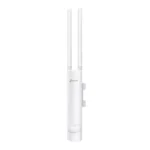
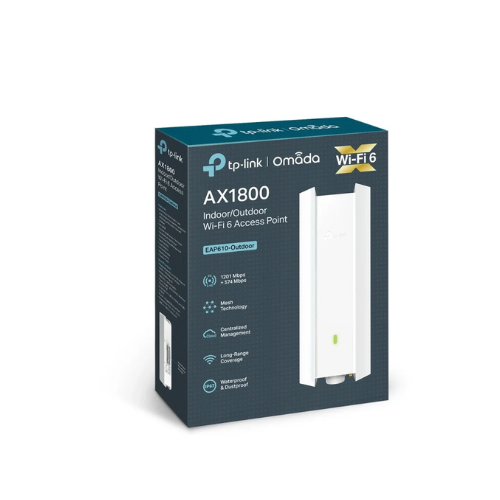
The TP-Link EAP610-Outdoor is a business-grade Wi-Fi 6 access point built to provide high-speed wireless connectivity in challenging commercial and residential landscapes. Operating on the high-efficiency AX1800 standard, this versatile device features a ruggedized chassis that withstands harsh weather conditions while delivering low-latency internet data. It serves as an ideal networking choice for open-air venues, school campuses, backyard areas, and indoor industrial warehouses.
Key Features and Specifications
This access point blends enterprise-grade processing chips with durable physical protection mechanisms.
- Wi-Fi 6 Technology: Increases overall network capacity and processing efficiency using advanced wireless architecture.
- 1800Mbps Dual-Band Speeds: Achieves up to 1201Mbps on the 5GHz band and 574Mbps on the 2.4GHz band.
- Weatherproof Enclosure: Boasts an IP67 rating to guarantee complete isolation against heavy rain, dust, and extreme heat.
- Omada SDN Integration: Supports unified local or cloud software-defined network management from a single interface.
- Power over Ethernet Support: Utilizes a single cable to transmit both electrical power and internet data simultaneously.
- Omada Mesh Support: Links multiple access points wirelessly to extend network coverage without adding new data lines.
- Fast Roaming Capabilities: Shifts moving mobile users between active network nodes seamlessly without experiencing dropped packets.
Industrial Grade Durability and Coverage
The EAP610-Outdoor resolves long-distance distribution problems through deliberate hardware engineering. Equipped with a specialized power amplifier and high-gain omnidirectional antennas, the device projects a reliable footprint across vast zones. The wireless signal can travel hundreds of feet into open environments while remaining stable for heavy multimedia use.
The physical housing is built to function reliably in temperature environments ranging from minus thirty degrees to seventy degrees Celsius. This ensures uninterrupted network availability during severe winter storms or peak summer heatwaves.
High Density Traffic Performance
The implementation of Wi-Fi 6 tools changes how this access point handles crowded client environments. Utilizing OFDMA and MU-MIMO architectures, the unit interacts with more than two hundred and fifty client devices at once. This significantly lowers network queuing overhead, allowing outdoor restaurants or active office floors to provide steady wireless performance to everyone simultaneously.
Deployment and Installation Frameworks
Mounting and activating this hardware tool requires minimal deployment labor due to versatile physical and systemic choices.
Power over Ethernet Deployment
- Mount the device to a secure wall or external pole using the packaged mounting kits.
- Run a weatherproof network cable from your indoor network switch to the access point base port.
- Connect the integrated PoE injector if your existing network switch lacks native power provisioning.
Omada Centralized Controller Configuration
- Connect your computer to the same local network subnet as the newly mounted access point hardware.
- Open your Omada controller software or access the cloud management dashboard via a web browser.
- Adopt the access point into your site architecture by clicking the device discovery option.
- Assign global wireless network profiles to push configurations automatically to the physical unit.
Frequently Asked Questions
Is the TP-Link EAP610-Outdoor suitable for purely indoor installations?
Yes, the sleek layout and low-profile aesthetics fit comfortably inside retail malls, corporate offices, or large residential spaces. It handles structural obstructions efficiently while providing enterprise security protocols.
What is the advantage of using Omada Mesh?
Omada Mesh allows you to position the access point in areas where running physical data wires is too difficult or expensive. The device communicates wirelessly with adjacent wired access points to relay user traffic back to your core network switch.
Does this device include a power adapter inside the box?
The package contains a dedicated passive Power over Ethernet injector instead of a conventional wall plug adapter. This configuration allows you to supply power safely over long distances using standard network cabling.
Can I manage this access point as a standalone unit without software controllers?
Yes, you can configure the device manually as an independent node. You can access settings through a local web browser interface or via the standalone management mode inside the Omada mobile phone application.




































Reviews
There are no reviews yet.