

Ultimate Guide to TP-Link Archer AX12 AX1500 Dual-Band Wi-Fi 6 Router
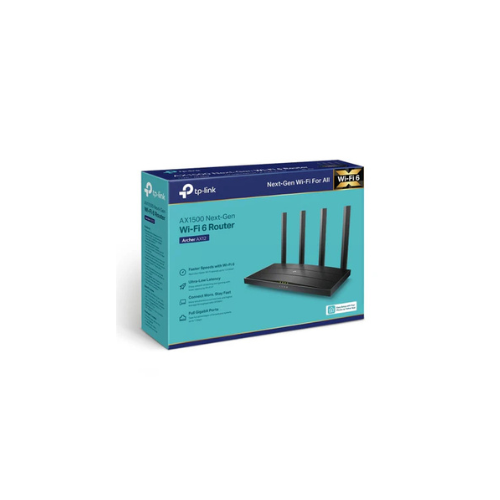
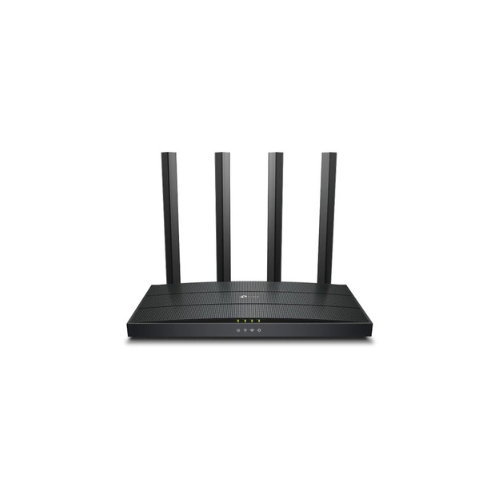
The TP-Link Archer AX12 is an entry-level Gigabit wireless router engineered to bring the speed, capacity, and efficiency advantages of Wi-Fi 6 to budget-conscious households. Operating on the AX1500 standard, this dual-band router delivers broad coverage and stable throughput. It provides a reliable internet backbone for daily online tasks like smooth high-definition streaming, virtual learning, remote office work, and casual online gaming.
Key Features and Specifications
This router blends next-generation wireless engineering with robust physical connectivity options.
- Next-Gen Wi-Fi 6 Standard: Boosts overall data transfer efficiency and network capacity across your entire household.
- 1500Mbps Dual-Band Speeds: Delivers data rates up to 1201Mbps on the 5GHz band and 300Mbps on the 2.4GHz band.
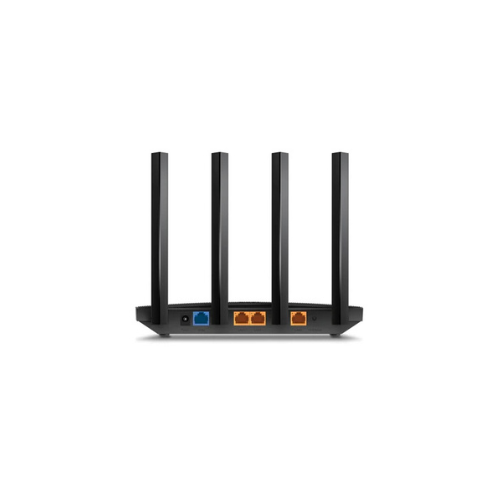
- Full Gigabit Port Array: Features one Gigabit WAN port and three Gigabit LAN ports to eliminate wired bottlenecks.
- Four High-Gain Antennas: Uses targeted beamforming technology to focus signal strength directly toward active client hardware.
- Advanced WPA3 Security: Employs the latest encryption protocol to safeguard your personal passwords and defend against cyber threats.
- Target Wake Time: Lowers power consumption for connected mobile devices and smart home accessories to prolong battery life.
- EasyMesh Compatibility: Pairs smoothly with other compatible mesh units to build a unified whole-home network under a single Wi-Fi name.
Wi-Fi 6 Efficiency and Low Latency Performance
The Archer AX12 overcomes the problem of network congestion and signal stuttering in modern device environments. Traditional routers force connected hardware to take turns receiving data, leading to buffering and lag when multiple household members browse simultaneously.
This model features advanced OFDMA and MU-MIMO technologies. By splitting wireless channels into smaller allocations, the router communicates with multiple devices at the same time. This significantly reduces data queuing, slashes network latency, and keeps video calls and movie streaming stable.
Focused Coverage and Enhanced Battery Savings
The physical hardware design focuses on maximizing signal penetration and smart resource management.
- Targeted Beamforming: Detects the location of your smartphone, laptop, or smart TV automatically, concentrating wireless energy directly toward the device rather than scattering it blindly.
- Intelligent Target Wake Time: Schedules specific times for your connected devices to wake up and transmit data, allowing battery-powered smart sensors and phones to remain in sleep mode longer to save power.
Step-by-Step Initial Setup Guide
Setting up your Wi-Fi 6 home network requires zero technical experience using guided mobile configuration tools.
Initial Hardware Configuration
- Unplug your internet provider modem from its power outlet and remove any backup battery if present.
- Connect the Archer AX12 WAN port directly to your modem’s network port using a standard Ethernet cable.
- Power on your modem first, then plug the router power adapter into a standard wall outlet.
- Wait for the front panel status LED indicators to light up solid, signaling that the hardware is ready for software activation.
Tether Mobile Application Setup
- Download the official TP-Link Tether app from the Apple App Store or Google Play Store onto your smartphone.
- Connect your phone wirelessly to the default Wi-Fi name printed on the technical specification label on the base of the router.
- Launch the application, log into your TP-Link ID profile, and select the Archer AX12 from the device discovery panel.
- Follow the step-by-step visual prompts to complete the quick installation wizard and apply a strong personal network password.
Frequently Asked Questions
Can the TP-Link Archer AX12 work with my older Wi-Fi 5 or Wi-Fi 4 devices?
Yes, the router is fully backward compatible. It connects seamlessly with devices using older wireless standards, allowing your legacy laptops, tablets, and smart home accessories to run safely at their maximum supported data speeds.
What is the advantage of the full Gigabit ports on this router?
Many budget routers use slower Fast Ethernet ports that cap your internet speed at 100Mbps. The Archer AX12 features full Gigabit ports, allowing you to get the absolute maximum performance out of high-speed internet subscriptions over 100Mbps on both wired and wireless connections.
Does this router feature built-in parental controls?
Yes, you can manage internet schedules and filter content profiles directly through the Tether mobile app. This allows you to pause the internet for specific devices, track online time, and ensure a safe browsing environment for children
Can I expand this router into a mesh network later?
Yes, the router supports the global EasyMesh standard. If you move into a larger home or encounter a stubborn dead zone in a far room, you can simply add any EasyMesh-compatible range extender or node to expand your coverage under a single Wi-Fi name




































Reviews
There are no reviews yet.