

Ultimate Guide to TP-Link 4G LTE Mobile Wi-Fi TL-M7200
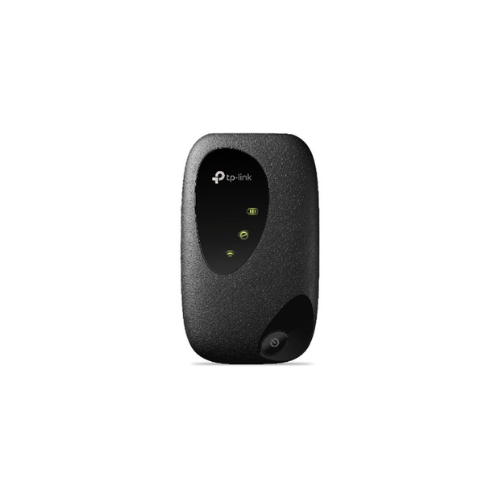
The TP-Link TL-M7200 is a pocket-sized mobile hotspot designed to provide high-speed internet access on the go. Supporting the latest generation 4G LTE networks, this compact device converts a cellular data signal into a private Wi-Fi network. It offers a reliable and highly portable solution for travelers, remote workers, and outdoor enthusiasts who need to keep multiple devices connected without relying on public hotspots.
Key Features and Specifications
This travel-friendly router packs advanced cellular modem technology and a rechargeable battery into a lightweight frame.
- 4G LTE Connectivity: Supports advanced network generations to deliver download speeds up to 150Mbps and upload speeds up to 50Mbps.
- 10 Device Sharing: Connects up to 10 wireless gadgets simultaneously, including laptops, tablets, smartphones, and smartwatches.
- 2000mAh Rechargeable Battery: Provides up to 8 hours of continuous data sharing on a single charge.
- Plug and Play Simplicity: Requires zero technical setup; just insert a compatible SIM card and press the power button.
- Compact Pocket Design: Features a smooth, lightweight casing that slides easily into pockets, bags, or travel pouches.
- Tether App Management: Allows easy data monitoring, battery tracking, and user management directly from your smartphone.
High-Speed Cellular Data Sharing and Travel Efficiency
The TL-M7200 eliminates the risk of unsafe public Wi-Fi networks by building a secure personal bubble. Operating with a built-in 4G LTE modem, the pocket router handles lag-free internet data for streaming movies, downloading work documents, and making smooth video calls.
Its ability to distribute bandwidth to 10 devices at once makes it perfect for family road trips or small group business meetings. Instead of purchasing expensive individual data roaming plans for every laptop and tablet, users can share a single local SIM card connection across all devices.
Long Battery Life and Smart Power Management
Equipped with a robust 2000mAh internal battery, the mobile hotspot matches an active lifestyle. The device sustains continuous operation for up to 8 hours during normal web tasks, keeping you online through a full workday or a long flight delay.
Power optimization is handled intelligently through the system software. If no wireless clients are connected for a set period, the device enters a power-saving sleep mode to preserve battery reserves for later use.
Quick Setup and SIM Card Activation
Getting your mobile network online takes less than a minute using a standard SIM card.
Hardware Initialization Steps
- Remove the back cover of the device using the small notch on the side of the casing.
- Take out the rechargeable battery to reveal the internal SIM card slot layout.
- Insert a valid Micro SIM card into the dedicated slot, ensuring the gold contacts face downward.
- Replace the internal battery, snap the back cover securely into place, and hold down the physical power button until the LEDs illuminate.
Connecting Your Devices
- Locate the default Wi-Fi name and password printed on the technical label inside the battery compartment.
- Open the wireless settings menu on your smartphone, laptop, or tablet.
- Select the TL-M7200 network identifier and input the security phrase to access the cellular internet stream.
Frequently Asked Questions
Does the TP-Link TL-M7200 support 5GHz wireless bands?
No, the mobile hotspot broadcasts its local Wi-Fi signal exclusively on the 2.4GHz frequency band. This standard ensures excellent range and broad compatibility, allowing older laptops, e-readers, and modern smartphones to connect easily.
Is this pocket router compatible with all cellular network providers?
The hardware is unlocked and compatible with major telecommunication networks worldwide. However, you should always verify that your specific network provider operates on standard 4G LTE FDD or TDD frequency bands before traveling
Can I manage my daily data limits through the device?
Yes, you can download the TP-Link tpMiFi or Tether mobile application onto your smartphone. The software allows you to establish strict monthly or daily data caps, monitor battery percentages, and block unauthorized users from your network.
Can the device operate permanently while plugged into a charger?
Yes, you can connect the mobile hotspot to a standard USB wall charger, a vehicle power port, or a portable power bank using the provided cable. The device will continue to share its 4G internet connection while replenishing its battery.




































Reviews
There are no reviews yet.