

Ultimate Guide to Mercusys MW306R 300Mbps Multi-Mode Wireless N Router
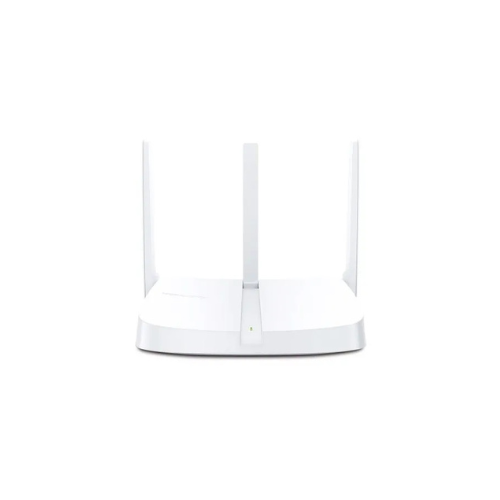
The Mercusys MW306R is a compact, highly efficient wireless N router designed to deliver stable and affordable internet connectivity for apartments, small homes, and student dorms. Operating on the 2.4GHz frequency band, this router provides a combined data transfer speed of up to 300Mbps. It offers a practical and space-saving solution for everyday digital workflows such as web browsing, sending emails, video streaming, and handling online homework assignments.
Key Features and Specifications
This entry-level router combines Multi-Mode flexibility with enhanced signal distribution hardware.
- 300Mbps Wireless Speeds: Delivers reliable data transmission performance on the 2.4GHz band for daily internet tasks.
- Three 5dBi High-Gain Antennas: Maximizes signal reception and coverage to minimize weak signal spots across your living space.
- 4-in-1 Multi-Mode Versatility: Supports Router, Access Point, Range Extender, and WISP operational modes.
- Simple 3-Step Installation: Features an intuitive web interface to get your local network online within minutes.
- Robust Parental Controls: Allows administrators to establish access schedules and manage domain permissions for family members.
- Guest Network Support: Creates an isolated wireless network block to protect private files from visitor traffic.
- IPTV and IPv6 Ready: Fully supports IGMP Proxy/Snooping, Bridge, and Tag VLAN to optimize high-definition streaming and next-gen networking.
Multi-Mode Adaptability and Traffic Control
The MW306R eliminates the need for separate networking devices by adapting to various deployment setups.
Equipped with three 5dBi high-gain antennas, it distributes signals evenly to combat structural drop-offs. The internal software features advanced IPTV optimization management, which prioritizes network packets for smooth, uninterrupted online media streaming and smart TV entertainment.
4-in-1 Application Layouts
The system firmware shifts its core configuration easily to satisfy different home networking roles.
- Router Mode: Connects directly to your service provider modem to act as the primary internet gateway for your workspace.
- Access Point Mode: Transforms an existing wired corporate network line into a fresh wireless hotspot for surrounding clients.
- Range Extender Mode: Captures an existing weak wireless signal from another source and projects it deeper into your home to boost coverage.
- WISP Mode: Connects wirelessly to an outdoor internet service provider network in areas without physical cable infrastructure.
Step-by-Step Initial Configuration Guide
Setting up your wireless home network requires no technical background using guided web management utilities.
Web Browser Configuration Steps
- Connect your computer to one of the available LAN ports on the router using a standard Ethernet cable, or join the default Wi-Fi network.
- Open any web browser and enter the default management web address listed on the base label of the router chassis.
- Create a secure administrator password to protect your internal system configuration database from unauthorized tampering.
- Select your local internet connection type and enter the subscription credentials provided by your service provider.
- Define your custom Wi-Fi name and input a strong wireless password key to finalize your settings.
Frequently Asked Questions
Can the Mercusys MW306R operate on the 5GHz Wi-Fi band?
No, this model functions exclusively on the far-reaching 2.4GHz wireless frequency band. This design choice maximizes long-range coverage and signal penetration through standard interior walls, as 2.4GHz waves travel further than high-frequency bands.
Does this router feature a physical WPS button?
The device handles secure wireless configurations via its intuitive web interface software rather than a dedicated physical button. This prevents unauthorized physical access attempts while maintaining high-grade data encryption tracking.
How do the built-in parental controls help manage my household?
The parental control system allows you to build customized device profiles. You can restrict the exact times specific devices can access the internet, view browsing logs, and block inappropriate URLs or content categories to ensure safe online space.
Is the hardware backward compatible with older computers?
Yes, the router is fully backward compatible with legacy computers running older wireless standards like 802.11b and 802.11g. It connects with older laptops, gaming consoles, and smart appliances seamlessly at their maximum hardware speeds




































Reviews
There are no reviews yet.