


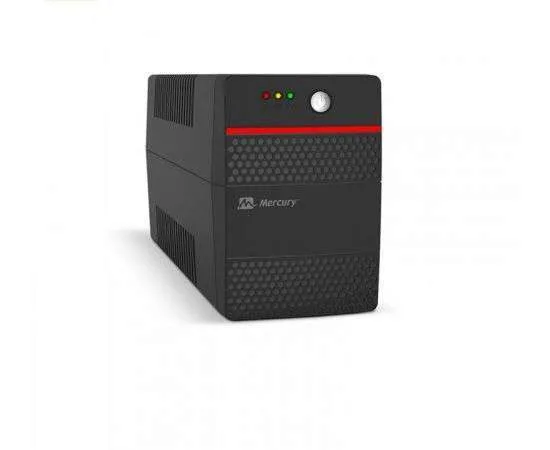
Mercury Maverick 850VA UPS
Key Features
850VA/510W,
2X Universal socket
Wave Form Battery Mode (Simulated Sine Wave) AC Mode (Synchronize with Input)
9AH BATTERY,
UK POWER CORD
Mercury 850VA ups Backup Time Typical 15mins~25mins (Depending On Load)
Input Voltage 220VAC
Input Frequency 50Hz
Single phase
Power Cord Built-in Cable with Fuse
Input Voltage Range 140~300VAC
Rating Output 850VA
1 Year Warranty
Ultimate Guide to Mercury Maverick 850VA Line-Interactive UPS
The Mercury Maverick 850VA is a compact, dependable line-interactive UPS engineered to shield home office computers, small business workstations, and networking equipment from unexpected power disruptions. Featuring built-in automatic voltage regulation (AVR) and intelligent microprocessor controls, this budget-friendly unit bridges the gap during unexpected brownouts or blackouts. It provides an excellent, low-maintenance hardware safeguard to prevent data corruption and terminal component damage in connected electronics.
Key Features and Specifications
This line-interactive battery backup system combines stable electrical filtration with essential multi-device protection.
- 850VA Power Capacity: Provisions up to 510 Watts of clean electrical energy to handle standard workstation demands.
- Automatic Voltage Regulation (AVR): Automatically boosts low voltage and trims high voltage to safe levels without depleting the battery.
- Microprocessor Control: Employs an intelligent internal chip layout to guarantee high reliability and precise wave-pacing.
- Universal Output Sockets: Features dedicated physical sockets tailored to link standard global and desktop hardware plugs directly.
- Overload and Short-Circuit Protection: Automatically trips an internal safety breaker if the attached equipment draws too much power.
- Audible Alarm System: Emits distinct sound patterns to immediately alert users of battery mode, low battery status, or system overload.
- Cold-Start Functionality: Powers up attached communication hardware natively directly from the internal battery cells during a total grid failure.
Intelligent Voltage Tracking and Component Safety
The Mercury Maverick 850VA eliminates the hazard of premature hardware failure, flickering screens, and random system reboots caused by an unstable utility grid. Standard surge bars simply shut off or pass unstable current when the power drops.
This model features advanced Line-Interactive Automatic Voltage Regulation. The hardware monitors incoming power phases constantly. If line voltage drops too low or spikes too high, the internal boost-and-trim transformer balances the current smoothly before it reaches your computer power supply. This filtration allows your sensitive electronics to continue working without drawing down the internal battery cache, preserving your battery runtime for actual blackout emergencies.
Simplified Utility Space Integration
The physical framework is optimized to integrate seamlessly into tight household desk nooks and compact retail register stations.
- Universal Socket Interfaces: Eliminates the risk of using flimsy external travel adapters by incorporating native universal socket interfaces directly into the rear casing.
- Smart Audio Indicators: Utilizes quick-reference audible beep alerts alongside front-panel LEDs to let users know when the grid power transitions to battery backup mode.
Step-by-Step Installation and Initialization
Deploying your backup power source takes only a few quick moments using simple physical alignment steps.
Physical Placement and Activation
- Place the tower unit upright on a flat, solid floor or shelf surface near your workspace, leaving ample air clearance around the ventilation slats.
- Ensure the placement area is completely dry, well-ventilated, and away from direct sunlight or excessive heat sources.
- Plug the primary power input cord from the UPS into a verified, grounded wall socket.
Charging and System Load Integration
- Leave the UPS connected to wall power for at least eight hours to let the internal cells reach peak charge depth before first use.
- Connect your computer tower, monitor, or network router directly to the rear backup sockets.
- Tap the physical power button on the front panel; the green status LED indicator will light up, confirming active filtering.
Frequently Asked Questions
How long will this Mercury Maverick 850VA UPS keep my equipment running during a blackout?
The exact runtime depends completely on the total power draw of your connected devices. For a basic home networking setup consisting of an internet modem and a Wi-Fi router, the unit can sustain internet connectivity for approximately 40 to 60 minutes. For a standard office desktop computer and a small LCD screen, it offers roughly 10 to 15 minutes of backup power, allowing ample time to save your data files and finish critical tasks safely
Can I plug a household laser printer into the Mercury Maverick 850VA?
No, you must never connect heavy laser printers or motorized appliances to standard desktop battery backups. Laser printers use high-energy fuser heating elements that draw massive spikes of electricity when initializing a print run. These sudden current spikes will instantly breach the 510-Watt safety cap of this unit, triggering an immediate overload shutdown to protect the internal inverter.
What should I do if the unit emits a continuous, unbroken alert tone?
A continuous alert tone typically indicates that the total load from your attached devices has broken past the maximum power capacity of the unit. Turn off the UPS and unplug high-power accessories or secondary screens from the backup ports until the total load stays under 510 Watts, then turn the system back on.
Is the internal battery permanent or user-replaceable?
The internal sealed lead-acid battery cell is engineered to provide reliable backup protection for approximately two to three years depending on your local room temperature and blackout frequency. When the battery eventually degrades and fails to hold a charge, it can be replaced with a standard 12V 9Ah replacement battery module by an authorized electronics technician.




































Reviews
There are no reviews yet.