

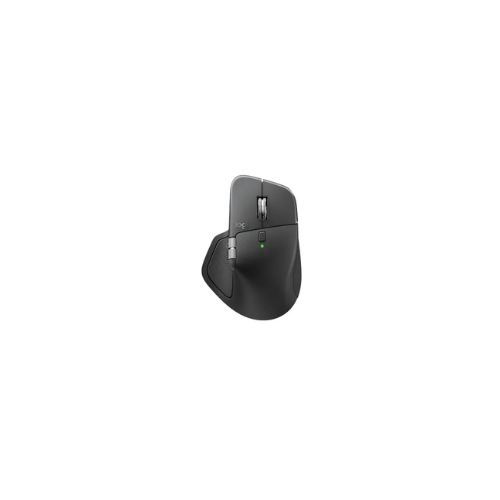
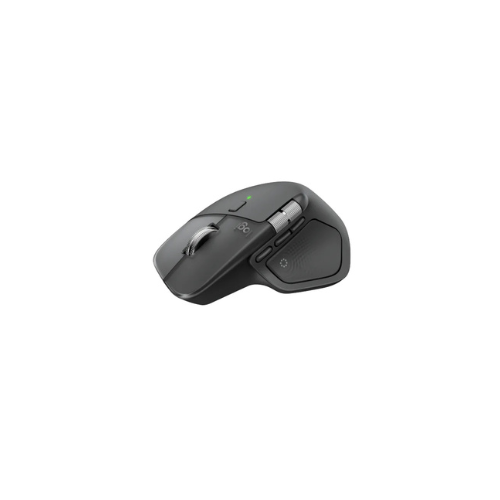
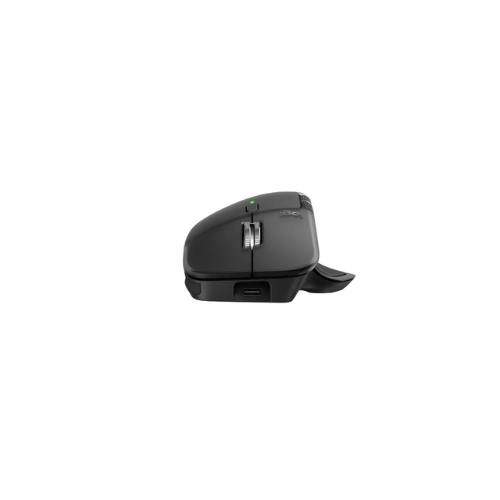
Logitech MX Master 4 Mouse Wireless, Rechargeable and Bluetooth
Key Features
Brand: Logitech
Darkfield sensor with up to 8,000 DPI
MagSpeed electromagnetic scroll wheel
Customisable haptic feedback and gesture controls
Bluetooth and Logi Bolt wireless connectivity
Multi-device pairing (up to 3 devices)
Long-lasting battery with USB-C fast charging
Ergonomic, premium design for professionals
FAST DELIVERY
1 Year Warranty
Ultimate Guide to Logitech MX Master 4 Wireless Performance Mouse
The Logitech MX Master 4 is a flagship, full-sized wireless mouse engineered specifically for power users, creators, and developers. Introducing an industry-first Haptic Sense Panel and an innovative digital Actions Ring, this premium ergonomic peripheral reinvents desktop navigation. It provides a high-utility, hyper-efficient hardware framework that slashes repetitive movements and bridges the gap between hardware controls and your creative software
Key Features and Specifications
This advanced desktop tool integrates built-in physical feedback with next-generation multi-device connectivity.
- Haptic Sense Panel: Delivers customizable tactile vibrations to confirm window alignments, grid snapping, and notifications.
- Actions Ring Overlay: Drops a dynamic, context-aware digital shortcut wheel directly under your cursor to skip menu searches.
- 8K DPI Darkfield Tracking: Uses a high-precision optical sensor that reads micro-textures effortlessly, tracking perfectly on glass.
- MagSpeed Electromagnetic Scrolling: Dual-mode metal wheel zips through 1000 lines per second and shifts instantly between free-spin and tactile ratchet modes.
- Horizontal Thumb Wheel: Positioned perfectly over the thumb rest to allow fluid timeline scrubbing and wide spreadsheet navigation.
- Quiet Click Technology: Suppresses sharp mechanical noise by 90 percent while preserving a crisp tactile click feel.
- 2X Stronger Connectivity: Packs an upgraded radio chip and optimized antenna to completely stop signal lag.
- USB-C Quick Charging: Delivers up to 70 days of power on a full charge, or gains 3 hours of operation from a rapid 1-minute plug-in.
Immersive Control and Time-Saving Overlays
The MX Master 4 solves the issue of friction in professional workflows by adding physical and visual shortcuts. The integrated Haptic Sense Panel provides physical feedback you can feel. Whether you are snapping images onto layout grids in design software, switching virtual desktops, or adjusting volume sliders, the mouse provides subtle, physical clicks to confirm actions.
Efficiency is further boosted by the Actions Ring interface. Activating this tool pulls up an on-screen radial menu right at your cursor. The ring adapts automatically to whatever application you are using, putting your most-used filters, brush sizes, or macro commands just millimeters away. This minimizes total hand tracking across large monitor screens by up to 63 percent.
Seamless Multi-Device Power and Flow
The core strength of the system is its ability to tie an entire multi-computer workstation together.
- Easy-Switch Channels: Connects with up to three independent devices—including laptops, tablets, and desktop towers—and switches between them instantly.
- Logitech Flow File Transfer: Links your workspace across separate Windows and macOS systems, allowing you to drag your cursor to the edge of one screen to copy-paste files or text to another machine.
- Dual Link Framework: Connects wirelessly using high-performance Bluetooth 5.1 or the included next-generation Logi Bolt USB-C receiver.
Quick Pairing and Configuration Steps
Integrating your performance mouse into your daily workflow takes less than a minute.
Bluetooth Synchronization
- Flip the power slider switch on the base of the mouse to turn the unit on.
- Tap the physical Easy-Switch button on the bottom panel to choose an open channel slot (1, 2, or 3).
- Press and hold the channel button down for three seconds until the corresponding LED indicator light flashes rapidly.
- Open your computer’s Bluetooth settings panel, discover new hardware, and click on the MX Master 4 identifier to lock the connection.
Logi Bolt USB-C Setup
- Plug the compact Logi Bolt USB-C receiver directly into an open port on your computer tower or laptop frame.
- Launch the free Logi Options+ software app downloaded from the official Logitech platform.
- Click the Add Devices option inside the software dashboard and follow the brief matching instructions to pair the hardware.
Frequently Asked Questions
What operating systems are fully compatible with the MX Master 4?
The mouse offers universal, out-of-the-box compatibility with Windows 11, macOS 12 or later, Linux, ChromeOS, iPadOS, and Android. Note that native Windows 11 Advanced Haptics integration requires the specific system software update released from late March 2026 onward.
Does the retail package include a USB-C charging cable?
No, the retail kit is designed with environmental sustainability in mind and contains the mouse and the Logi Bolt USB-C receiver, excluding a charging cable. The internal fast-charging battery can be replenished using any standard, pre-existing USB-C cord you own.
What is the purpose of the horizontal thumb scroll wheel?
The dedicated thumb wheel is designed specifically for horizontal navigation. It allows video editors to zip fluidly left and right across complex editing timelines, musicians to scrub audio tracks, and financial analysts to navigate massive spreadsheets effortlessly without touching keyboard buttons.
Can I customize the haptic vibration intensity of the mouse?
Yes, you can manage all tactile profiles through the Logi Options+ app interface. The software allows you to toggle specific haptic triggers, alter the vibration intensity, and download custom workflow plugins tailored for creative application sets. [1]




































Reviews
There are no reviews yet.