

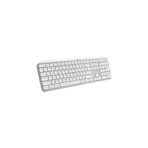
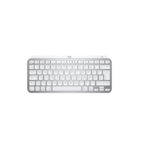
Logitech mx keys Mini for Mac Bluetooth illuminated keyboard- 920-010526
Key Features
Brand: Logitech
Bluetooth 5.0 LE Connectivity
Slim & Compact Design
Smart Illumination
Perfect Stroke Keys
Logitech Flow Compatible
Works with Logi Bolt Wireless Adapters
Smart Keys
Compatible with Multiple Platforms
FAST DELIVERY
1 Year Warranty
Logitech mx keys Mini for Mac Bluetooth illuminated keyboard- 920-010526
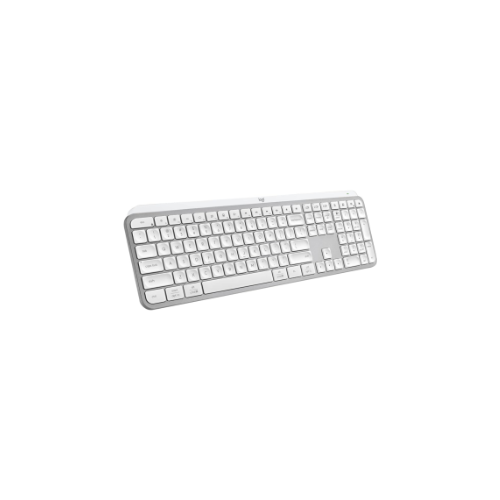
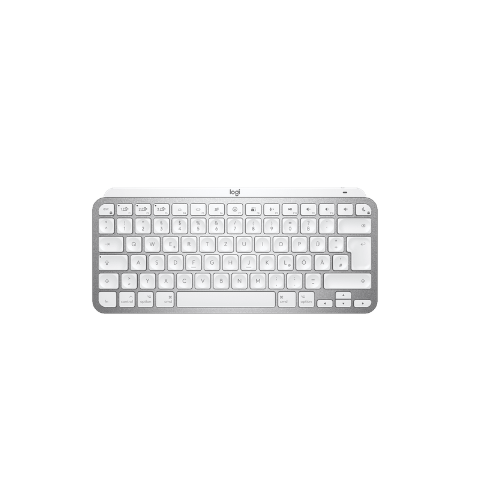
The Logitech MX Keys Mini for Mac is a premium, high-performance minimalist wireless keyboard engineered specifically for macOS, iPadOS, and iOS ecosystems. Optimized for creators, software developers, and digital professionals, this compact keyboard combines ergonomic tactile responsiveness with seamless multi-device flow to maximize typing speed and eliminate workspace clutter.
Crafted for Mac and Multi-Device Connectivity
The physical and hardware architecture is optimized to interface seamlessly with Apple hardware ecosystems:
- Dedicated Apple Layout: Features a native Mac key layout with dedicated Command, Option, and control keys, completely removing layout confusion common with universal keyboards.
- Space-Saving Minimalist Design: The compact form factor places your mouse closer to your body’s centerline, promoting better shoulder alignment, reducing reach fatigue, and freeing up valuable desk real estate.
- Multi-Device Easy-Switch Keys: Outfitted with high-speed Bluetooth Low Energy pairing channels that let users link up to three independent devices—such as a MacBook Pro, an iPad Pro, and an iPhone—and switch between them instantly with a single keystroke.
- Logitech Flow Optimization: Integrates with the Logi Options+ software utility, allowing users to type across multiple distinct computers, transfer clipboard files, and share assets smoothly when paired alongside an MX Master 3S for Mac mouse.
Perfect Stroke Typing and Smart Backlighting
The interior component layout focuses on fluid tactile feedback and reactive lighting adaptations:
- Spherically-Dished Keys: Every low-profile key is physically molded to match the natural curvature of your fingertips, ensuring precise finger placement and clean mechanical execution.
- Tactile Stability Response: Increased key stability significantly dampens structural typing noise while optimizing responsiveness, allowing for quiet operation in quiet office spaces or library environments.
- Smart Proximity Illumination: Embedded ambient light sensors automatically track hand movements, turning the backlighting on as fingers approach and dimming it when the keyboard is left idle to save power.
- Dynamic Lighting Adaptation: The backlighting automatically calibrates its brightness level to match changing room lighting conditions, or can be manually locked to a preferred setting via Option buttons.
Smart Keys and Efficient Battery Architecture
The system integrates quick-access utility keys to accelerate daily creative and communication workflows:
- Dedicated Dictation Keystroke: Features a built-in talk-to-text hotkey that lets users input spoken notes directly into any active text field or document application.
- Instant Emoji Selector: Includes a single-touch emoji panel button to rapidly open the native macOS emoji window without clicking through system submenus.
- Microphone Mute Toggle: Provides a universal microphone mute and unmute key, enhancing security and privacy during active Zoom, Teams, or FaceTime conferences.
- USB-C Fast Charging: Delivers up to 10 full days of operation on a single charge with backlighting enabled, or up to 5 months of continuous typing with the backlighting turned off completely.
Technical Specifications
| System Feature | Technical Specification Blueprint |
|---|---|
| Model Designation | MX Keys Mini for Mac (Pale Grey / Space Gray variants) |
| Connection Protocol | Bluetooth Low Energy (Compatible with Logi Bolt USB Receiver, sold separately) [1, 2] |
| Platform Compatibility | macOS 10.15+, iPadOS 14+, iOS 14+ [1, 2] |
| Physical Button Count | Compact 79-key minimalist layout |
| Charging Interface | USB Type-C (USB-C to USB-C charging cable included) [1] |
| Chassis Core Build | Single-body integrated metallic plate structure [2] |
| Wireless Operating Range | Up to 10 meters (33 feet) stable link field [1] |
| Physical Dimensions | 295.99 mm L x 131.95 mm W x 20.97 mm H [1] |
| Equipment Net Weight | Approximately 506.4 grams [1] |
Frequently Asked Questions
Will this keyboard function with a Windows PC or an Android tablet?
Yes. While the keyboard is specifically tailored and labeled with a Mac key layout, the underlying Bluetooth technology allows it to pair and type on Windows and Android operating systems. However, certain specialized smart keys, like the native dictation shortcut, might require custom mapping or vary in functionality outside Apple software ecosystems.
Yes. While the keyboard is specifically tailored and labeled with a Mac key layout, the underlying Bluetooth technology allows it to pair and type on Windows and Android operating systems. However, certain specialized smart keys, like the native dictation shortcut, might require custom mapping or vary in functionality outside Apple software ecosystems.
Does the package include a Logi Bolt USB wireless receiver?
No. The MX Keys Mini for Mac relies entirely on internal Bluetooth Low Energy to connect out of the box. If you work in a high-interference environment or require an encrypted wireless link, the keyboard is fully compatible with the Logi Bolt USB Receiver, but it must be purchased separately. It does not support older Logitech Unifying receivers.
No. The MX Keys Mini for Mac relies entirely on internal Bluetooth Low Energy to connect out of the box. If you work in a high-interference environment or require an encrypted wireless link, the keyboard is fully compatible with the Logi Bolt USB Receiver, but it must be purchased separately. It does not support older Logitech Unifying receivers.
How do I clean and maintain the low-profile key switches over time?
To safely remove dust, paper fibers, or hair from beneath the scissor-switch keycaps, use a standard can of compressed air directed at a 45-degree angle. For surface oils, lightly dampen a microfiber cloth with water or a mild isopropyl alcohol solution and gently wipe the keys down while the keyboard is powered off. Never spray cleaning liquids directly onto the housing.
To safely remove dust, paper fibers, or hair from beneath the scissor-switch keycaps, use a standard can of compressed air directed at a 45-degree angle. For surface oils, lightly dampen a microfiber cloth with water or a mild isopropyl alcohol solution and gently wipe the keys down while the keyboard is powered off. Never spray cleaning liquids directly onto the housing.




































Reviews
There are no reviews yet.