

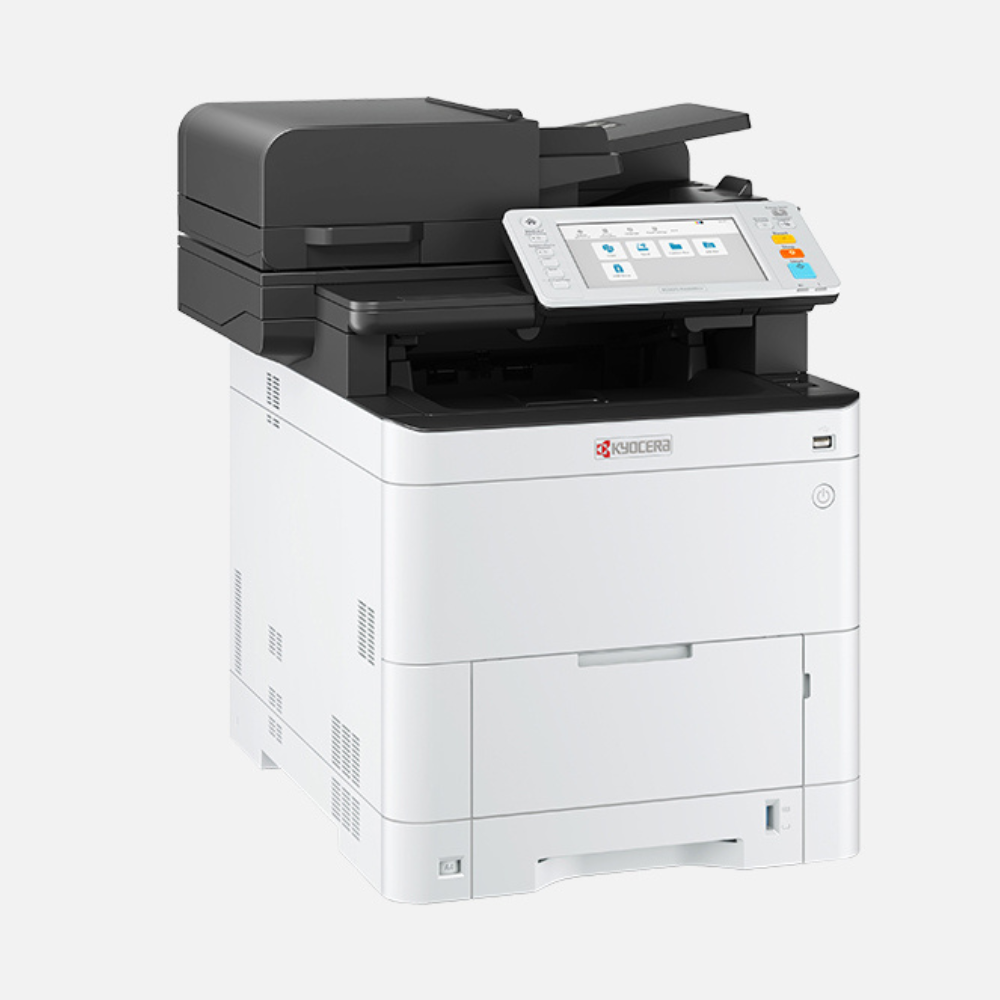
Kyocera Ecosys MA3500cix Printer Colour Multifunction Laser
Key Specifications:
Brand: Kyocera
Double-sided print, copy and scan
Data overwrite and encryption, Trusted Platform Module, Secure Boot and Run Time Integrity Check, S/MIME and TLS 1.3
HyPAS solution platform enables powerful customisations
Strengthened affinity with Microsoft Universal Print
Up to 35 pages A4 per minute in colour and b/w
1200 x 1200 dpi (print, at reduced speed) 600 x 600 dpi (scan/copy)
Dimensions (W x D x H) 480 × 577.5 × 571.5 mm
Kyocera Ecosys MA3500cix Colour Multifunction Laser Printer Review and Guide
The Kyocera Ecosys MA3500cix is a high performance colour multifunction laser printer engineered for medium and large workgroups. This heavy duty device combines print, scan, and copy functions with exceptional eco friendly efficiency. This guide covers its standout features, technical specifications, and network deployment configuration.
Key Features of the Ecosys MA3500cix
- High Printing Speeds: Delivers up to thirty five pages per minute in both crisp monochrome and vibrant colour.
- Double Sided Efficiency: Standard automatic duplex printing and scanning cuts paper consumption and saves office time.
- Ecosys Long Life Technology: Utilizes durable drums and components to reduce waste and lower total cost of ownership.
- Advanced Security Protocols: Features data encryption, overwrite security, and secure print features to protect sensitive files.
- Large Touchscreen Panel: Seven inch full colour touchscreen display simplifies complex job programming and workflow navigation.
- HyPAS Solution Platform: Enables powerful customization and integration with business applications and cloud services.
- Robust Paper Management: Handles diverse media sizes and weights across multiple heavy duty paper feed cassettes.
- High Yield Consumables: Long lasting toner cartridges minimize routine maintenance intervals and maximize uptime.
- Energy Saving Engineering: Low power consumption modes reduce electricity costs and workplace environmental impact.
- Versatile Connectivity: Supports high speed USB, gigabit network connections, and direct mobile printing protocols.
Specifications and Performance
Print and Scan Metrics
- Print Resolution: True 1200 by 1200 dots per inch resolution for fine lines and accurate colour matching
- Scan Capabilities: Single pass duplex automatic document feeder captures up to one hundred images per minute
- Monthly Duty Cycle: Built to handle up to one hundred thousand pages per month for maximum durability
Hardware and Capacity
- Standard Paper Feed: Two hundred fifty sheet main cassette and one hundred sheet multipurpose bypass tray
- Processor and Memory: Dual core one point two gigahertz processor backed by one point five gigabytes of internal RAM
- Storage Options: Supports high capacity solid state drive upgrades for local document box archiving
Step by Step Installation and Setup
1. Placement and Stripping
Carefully remove the heavy printer chassis from the shipping container using multiple people. Place the unit on a sturdy level surface near a wall outlet and remove all bright plastic transit locks and tape.
2. Consumables Verification
Open the front access door to ensure all four toner cartridges are locked in place. Check that the waste toner container is correctly mounted, then snap the main hatch shut firmly.
3. Media Configuration
Pull out the primary paper cassette and slide the blue plastic width and length guides to match your paper stock size. Insert up to two hundred fifty sheets of plain paper, close the drawer, and load any specialized media into the bypass tray.
4. Power and Initial Initialization
Connect the power cord directly to a grounded electrical outlet and press the main power switch on the front panel. Select your language, set the date and time via the touchscreen, and allow the machine to complete its initial self test.
5. Network Deployment and Software
Plug a network cable into the gigabit ethernet port on the back of the device. Access the official Kyocera support webpage on your computer to download the latest KX print driver package. Execute the installer file, select your discovered network printer, and finalize the setup.
Frequently Asked Questions
Does the Kyocera Ecosys MA3500cix support wireless Wi Fi connectivity?
Wireless networking is optional on this model and requires installing a separate specialized internal wireless interface card.
How do I set up the secure print feature?
Enable the private print option inside your computer print driver settings, assign a custom four digit PIN code, and enter that PIN on the printer touchscreen to release the job.
What should I do when the touchscreen displays a replace waste toner box message?
Open the front cover, carefully unlatch the full plastic waste container to prevent spilling powder, slide a fresh genuine container into the slot, and close the door.
Can this printer scan directly to a shared network folder?
Yes you can configure scan to SMB or scan to FTP destinations by accessing the embedded command center RX web interface through your internet browser.
Is the Ecosys MA3500cix compatible with mobile devices?
Yes full mobile support is built in including compatibility with Apple AirPrint, Mopria print services, and the dedicated Kyocera Mobile Print app.




































Reviews
There are no reviews yet.