


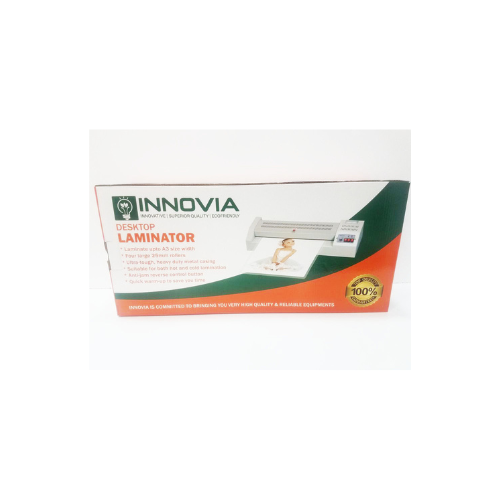
Innovia A3 Laminator Machine
Key Features
Brand: Innovia
Heavy-duty metal chassis.
Hot and Cold Lamination Settings.
Quick warm-up time: 3-5 mins.
With reverse switch.
With a temperature control knob and temperature meter.
Supports up to A3 size.
FAST DELIVERY
Ultimate Guide to Innovia A3 Laminator Machine
The Innovia A3 Laminator Machine is a sleek, premium everyday office appliance engineered to deliver crisp laminating performance, smooth processing, and a modern aesthetic to any desk. Featuring a highly versatile A3-sized feed canvas, a fluid thermal regulation system, and an ultra-slim, space-saving profile, this laminator fits perfectly into home offices, student study spaces, and corporate environments. It offers a high-utility, space-conscious hardware solution that balances everyday performance with exceptional operational comfort and security.
Key Features and Specifications
This compact desktop appliance balances premium mechanics with modern thermal pacing and safety tools.
- Versatile A4 to A3 Feed Canvas: Offers an optimized 330mm entry throat size for clear document preservation without crowding small workspace desks.
- Fluid Manual Interactivity: Delivers ultra-smooth processing queues and responsive operation via simple physical toggle switches, completely eliminating complex digital interface restrictions.
- Ultra-High Thermal Saturation: Renders clear adhesive bonds and sharp graphics via a densely packed internal dual-roller heating layout.
- Vivid Material Calibration: Engineered to support pouch thicknesses ranging from standard flexible sheets to heavy-duty structural covers
- Ultra-Slim Micro-Edge Frame: Uses an incredibly thin, low-profile chassis layout to maximize your active desk room and support clean multi-device workspace setups.
- Multi-Material Interfaces: Includes built-in switches to safely toggle between modern cold-press self-adhesive pouches and traditional thermal hot-lamination files.
- Integrated Cord Consolidation: Features a tailored physical architecture with insulated wiring pathways to keep your workshop completely free from cord clutter.
- Advanced Operational Comfort: Certified with safety temperature cutoffs, incorporating an always-on automatic overheat protection system to stop harmful device overloads without ruining true execution tracking.
Fluid Everyday Lamination and Document Protection Optimization
The Innovia A3 Laminator addresses the problem of user fatigue and choppy bubbling errors common with older manual cold-press tools and basic desktop pouch units. Toggling between multiple thick classroom flashcards, certificates, and presentation sheets on standard poorly insulated entry units can cause noticeable adhesive pooling and physical strain during long production blocks.
This model features an upgraded high-efficiency heating engine pushing through standard pouch sizes with rapid turnaround. The increased thermal pacing ensures that daily restaurant menus, archived chart animations, and corporate badge packages render fluidly without ghosting or unsealed edge failures. Operation streams stay highly uniform from start to finish, making it an excellent platform for protecting identity sheets, building creative layout workspaces, or laminating batches of business materials.
Simplified Workspace Integration and Pouch Management
The physical hardware architecture focuses on maintaining a minimalist workspace while supporting versatile material protection.
- Integrated Status Consolidation: The sleek chassis houses clear front-facing visual LED indicators to let you verify warm-up readiness and active power tracking cleanly at a single glance.
- Flexible Dual-Roller Pairing: Houses precision-aligned silicone rollers, allowing you to feed delicate thin photo printouts and rigid cardstock document packages concurrently.
- Smart Quick-Release Release Lever: Features a specialized rear mechanical jam-clearing lever, letting you manually adjust roller tension to pull out misaligned or crookedly fed sheets instantly without complex disassembly.
Quick Physical Setup and Calibration Steps
Assembling and optimizing your desktop laminator layout takes only a few quick moments using standard out-of-the-box paths.
Laminator Placement and Cable Connection
- Place the sturdy laminator base upright on a flat, clean workspace close to a steady wall outlet.
- Clear at least 15 cm of open, unobstructed space behind the device exit slot to allow finished hot pouches to slide out completely flat.
- Plug the heavy-insulated power cord firmly into a grounded wall circuit and turn the main switch on.
- Set the physical toggle switch to your chosen Hot or Cold operational mode, load your document media neatly inside the pouch film, and let the machine pull the sealed edge tightly into the casing.
Initial Configuration Optimization
- Tap the main power toggle switch located on the side or upper control panel block.
- Wait a few moments for the visual “Ready” indicator light to transform from standby to active green status, confirming the rollers have reached the ideal temperature threshold.
- Keep the parsing stream moving smoothly by grouping sheets cleanly within the designated maximum micron width limit.
- Run a quick check to verify the closed, sealed edge of the lamination pouch always enters the throat first to lock your rollers onto pristine jam-free registration settings.
Frequently Asked Questions
- Does this machine include an integrated automatic paper trimmer on top?
The Innovia A3 Laminator focuses strictly on heavy-duty thermal bonding and does not feature built-in blade cutters. To trim down oversized plastic margins, you can easily use standard office scissors or a separate desktop rotary paper cutter after the pouch cools completely. - Can I pass thick items like cardboard or multiple overlapping sheets through the entry throat?
No, the entry pathway is engineered explicitly for standard paper stock and matching laminating pouches. Feeding heavy structural cardboard or wrinkled multi-page materials can overwhelm the internal dual-roller spacing and trigger a hard paper jam. - Is it safe to laminate heat-sensitive materials like thermal fax paper or ultrasound scans?
You should avoid using the “Hot” lamination mode for thermal papers, as the high operating temperatures will completely black out the print. For sensitive documents, flip the physical selector to the “Cold” interface mode and utilize self-adhesive cold-press laminating pouches instead. - How does the dual-roller design affect my office work compared to cheaper single-element models?
Its primary office benefit is minimized rework guesswork. Instead of outputting wavy, wrinkled, or unevenly heated plastic sheets, the dual-roller architecture applies continuous uniform pressure and heat across the entire width of the page, yielding perfectly flat results and lowering strain over long working hours.




































Reviews
There are no reviews yet.