


Ultimate Guide to HP LaserJet Tank MFP 2602sdw All-in-One Wireless Printer
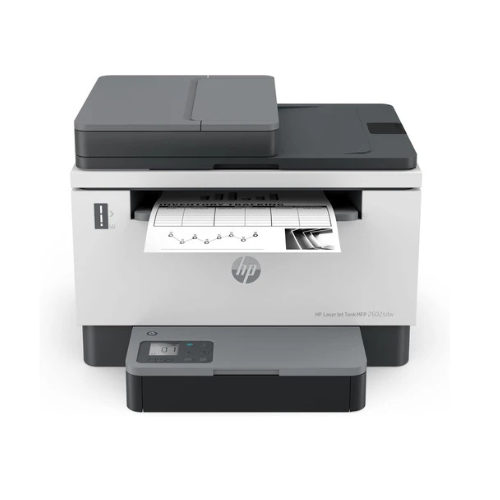
The HP LaserJet Tank MFP 2602sdw is a revolutionary, multi-function monochrome laser printer engineered to provide high-volume document management at an exceptionally low operating cost. Moving away from traditional high-cost plastic cartridges, this innovative machine features an integrated internal toner storage tank that can be replenished in seconds using a mess-free injection kit [W154A]. It delivers a comprehensive, low-maintenance hardware setup that consolidates high-speed printing, scanning, and copying into a single space-saving desktop footprint.
Key Features and Specifications
This commercial-grade office tool combines an advanced refillable toner system with robust physical paper tracking.
- 3-in-1 Workspace Multi-Functionality: Handles high-resolution monochrome printing, rapid flatbed scanning, and clear document copying.
- Ultra-Low Cost Per Page: Drastically reduces overall printing expenses compared to traditional toner cartridges by using bulk reload technology [W154A].
- Preloaded for High Volumes: Ships with enough original HP toner pre-installed to print up to 5000 standard monochrome pages out of the box.
- Rapid Print Output Speeds: Fires out professional business documents at speeds up to 22 pages per minute.
- Automatic Document Feeder: Features a 40-sheet ADF to automate the scanning and copying of multi-page text records.
- Automatic Two-Sided Printing: Executes rapid dual-sided printing natively to cut paper consumption and office operating overhead.
- Dual-Band Self-Healing Wi-Fi: Tracks wireless signal drops dynamically, switching frequency bands automatically to maintain a stable link.
- HP Smart App Support: Enables rapid network initialization, remote printing, secure cloud scanning, and real-time toner level diagnostics.
Refillable Toner Tank Economics and Structural Sustainability
The MFP 2602sdw redefines how desktop laser printers handle routine maintenance by replacing structural plastic housings with an injection framework [W154A]. Traditional cartridge swaps require discarding complex rollers and mechanical gears every time the toner runs out [W154A].
This system uses an internal storage tank replenished via an official syringe-style container [W154A]. The physical configuration ensures that toner dust stays locked inside the tube, eliminating messy spills on your hands, clothing, or workspace [W154A]. Stripping away excess internal cartridge hardware reduces plastic weight, allowing eco-conscious businesses to lower landfill waste without sacrificing print capacity [W154A].
Seamless Document Workflows and High-Contrast Output
The hardware configuration features an intuitive physical layout designed to maximize daily office productivity.
- 40-Sheet Automatic Document Feeder: Automates multi-page copying and scanning tasks, allowing workers to process long stacks of invoices or contracts hands-free without manual sheet-by-sheet placement.
- HP Original Precision Monochrome Toner: Bonds with paper fibers smoothly to deliver sharp text characters, deep dark contrasts, and clear borders that resist smudging from text highlighters [W154A].
Step-by-Step Initial Hardware Activation and Setup
Deploying your refillable laser system requires only a few moments using standard mobile or desktop tools.
Initial Physical Configuration
- Place the printer chassis on a stable, level desk that leaves ample clearance for the top automatic document feeder lid to swing open.
- Remove all bright orange structural shipping tapes and protective plastics from the exterior casings and paper trays.
- Pull out the primary paper drawer, adjust the sliding plastic length guides, and load standard plain copy paper.
- Connect the power cord to a standard wall socket and tap the physical power button located on the front control panel.
Software and Wireless Synchronization
- Download the official HP Smart software application onto your smartphone or office computer.
- Select the setup a new printer option inside the application dashboard to discover the hardware via Bluetooth or local wireless tracking.
- Provide your office Wi-Fi name and password credentials when prompted to link the machine to your local subnet.
- Let the configuration wizard complete its automated alignment script, then launch a test print to confirm active network data parsing.
Frequently Asked Questions
Which specific replenishment kit model does this printer use?
The printer is engineered to function exclusively with the HP 154 family of genuine LaserJet Tank reload kits [W154A]. When the front panel indicator warns you that the internal storage tank is running low, you can inject a fresh supply of toner using the HP 154A reload kit (yields roughly 2500 pages) or the high-capacity HP 154X reload kit (yields roughly 5000 pages) [W154A].
Can I inject a fresh reload kit into the printer at any time?
The printer features an intelligent mechanical lock on the reload port. It blocks insertion until the internal toner levels drop below a specific threshold to prevent overfilling. Wait until the low-toner indicator light illuminates on your display panel before attempting to use a reload kit [W154A].
Do I need to replace the imaging drum every time I reload the toner?
No, the heavy-duty imaging drum inside HP LaserJet Tank printers is independent of the toner reload port and is built to handle up to 50000 pages before requiring service [W154A]. This allow you to top off the printer internal tank multiple times before ever worrying about changing core hardware parts [W154A].
Does this printer support printing from mobile phones without downloading software?
Yes, the internal network firmware features native support for universal wireless communication protocols, including Apple AirPrint and Mopria Alliance standards. This allows users on iPads, iPhones, and Android smartphones to execute print jobs instantly using native system print buttons whenever they share the same Wi-Fi subnet.




































Reviews
There are no reviews yet.