

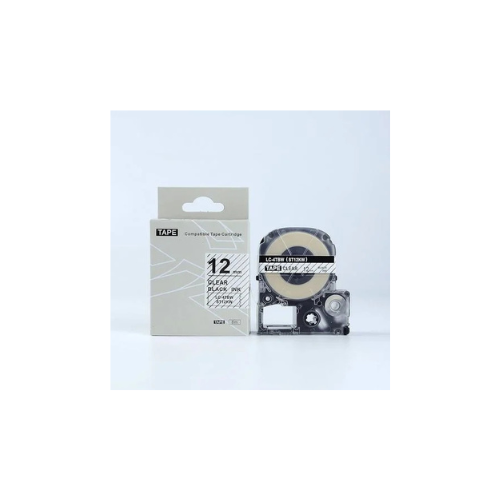
Epson SS12KW 12mm x 8m Black on White Tape
Key Features
Brand: Epson
12mm x 8m tape for medium labeling
Black ink on white polyester for contrast
Permanent adhesive for surfaces
Thermal transfer for sharp prints
Fits Epson LabelWorks printers
FAST DELIVERY
1 Year Warranty
Epson SS12KW 12mm Black on White Label Tape (Compatible) Review and Setup Guide
The Epson SS12KW Compatible Label Tape is a commercial-grade, standard-format thermal labeling solution engineered for corporate office organization, asset management, network cabling, and robust facility cataloging. Printing high-contrast black text on a crisp white background, this 12mm width media offers excellent balance, providing maximum readability for folders, shelves, machinery, and electrical equipment. This comprehensive guide covers key product features, technical hardware specifications, and machine installation instructions.
The Epson SS12KW Compatible Label Tape is a standard laminated thermal tape engineered for versatile multi-surface applications across commercial workspaces and heavy-duty industrial setups. Operating on advanced thermal transfer technology, this cartridge feeds tough polyester film media to output smear-proof, waterproof text markings without requiring separate ink or toner refills. It features a split-back liner and integrated internal alignments to streamline high-volume labeling workflows on flat, textured, or curved surfaces. For a comprehensive overview, technical performance specifications, and troubleshooting steps, review the full guide below.
Premium Design and Key Features
High Legibility Visual Contrast
The tape cartridge creates highly prominent classification markings by executing bold black lettering onto a bright white canvas. This specific configuration ensures that data barcodes, shelf numbers, inventory tracking codes, and asset titles remain cleanly readable across broad office lighting environments.
Laminated Multi-Layer Film Durability
Constructed from high-grade polyester (PET) materials, the structural label film features specialized self-laminating layers. This protective layout completely shields your printed text from everyday physical friction, mechanical abrasion, water submersion, grease spills, and harsh commercial cleaning chemical exposures
All-Weather Acrylic Adhesive Backing
The label media incorporates a strong permanent acrylic adhesive matrix that bonds securely to flat, textured, or uneven surfaces. It maintains long-lasting, reliable structural adhesion without peeling or cracking through extreme temperature variations spanning -20°C up to 60°C.
Split-Back Easy-Peel Liner
The non-adhesive backing sheet includes a user-friendly physical split down the center axis. This engineering modification lets field engineers and office workers peel away the protective layer quickly without damaging corners, bending the label materials, or leaving sticky oil on fingers.
Technical Specifications
-
- Model Cross-References: SS12KW Compatible (Direct replacement for Epson LK-4WBN, LC-4WBN, and LC-4WBN9)
- Tape Width: 12 Millimeters (0.47 Inches) Standard Mid-Size
- Roll Length: 8 Meters (26.2 Feet) of Total Printable Media
- Visual Palette: Sharp Black Text on Solid White Matte Background
- Material Base: Dura-Coated Laminated Polyester (PET) and ABS Casing
- Print Technology: Thermal Transfer (No ink or toner required)
- Temperature Range: -20°C to 60°C (-4°F to 140°F)
- Resistance Profile: Anti-Corrosion, Waterproof, Oilproof, Scratch Resistant, UV Fade Protected
- Adhesive Matrix: Permanent All-Surface Standard Acrylic Bond
Step-by-Step Installation Guide
Cartridge Loading and Inspection
- Turn off your label maker and flip open the rear or top plastic access cover lid of the machine.
- Examine the internal print mechanism bay to clear out loose label fragments, lint, or layout debris.
- Remove the new 12mm black on white compatible cassette from its protective wrapping.
- Look through the clear cartridge casing window to verify that the carbon ink ribbon guide path is taut.
- Turn the integrated manual plastic gear wheel clockwise to collect any slack ribbon if necessary.
- Align the cartridge housing slots carefully with the structural alignment pins inside the printer bay.
- Push the cartridge straight down firmly until it clicks completely into its home position.
- Thread the loose label tape tail clean through the integrated cutter exit slot opening on the side panel.
- Close the printer access lid securely, power on the device, and press the physical feed button to confirm alignment




































Reviews
There are no reviews yet.