

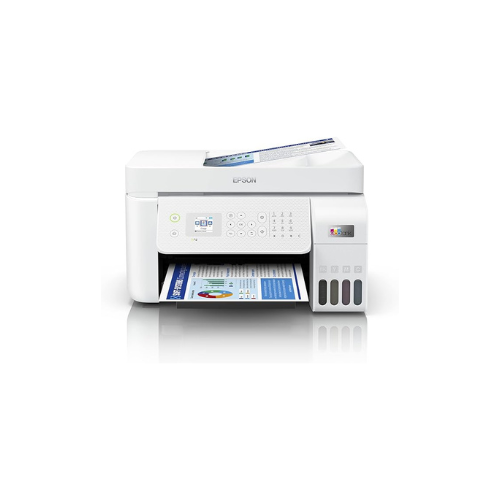

Epson EcoTank L5296 A4 Wi-Fi All-in-One Ink Tank Printer with ADF
Key Features
Brand:Epson
Model Number- L5296
Printer Functions- Print, Copy, Scan & Fax
Type- All in One
Color- White
Connectivity- USB, Ethernet & Wi-Fi
Weight- 6.00 kg
Printing Method- Epson Micro Piezo™ print head
Ink Technology- Dye Ink
Printing Resolution- 5.760 x 1.440 DPI
Number of colours- 4 colour
FAST DELIVERY
Ultimate Guide to the Epson EcoTank L5296 A4 Wi-Fi All-in-One Ink Tank Printer
The Epson EcoTank L5296 sets the standard for high-efficiency, multi-functional printing in modern home offices and small business environments. This premium all-in-one printer completely eliminates the frustration of expensive ink cartridges by deploying an integrated high-capacity ink tank system
Technical Specifications and Performance Metrics
Reviewing the exact hardware capabilities ensures this high-volume printing engine perfectly aligns with your office production demands.
-
- Product Type: A4 All-in-One Ink Tank Printer
- Core Functions: Print, Scan, Copy, and Fax
- Document Feeder: Integrated 30-Sheet Automatic Document Feeder (ADF)
- Connectivity Options: Wi-Fi, Wi-Fi Direct, High-Speed USB, and Ethernet
- Print Technology: PrecisionCore Heat-Free Technology
- Maximum Resolution: 5760 by 1440 Dot-Per-Inch (DPI)
- Paper Input Capacity: 100 Sheets of Standard Plain Paper
- User Interface: 1.44-inch Color Liquid Crystal Display (LCD) Screen
Key Features of the EcoTank L5296
Revolutionary Cartridge-Free Ink Tank System
The core benefit of the EcoTank framework is its front-facing integrated ink tanks. Users can easily monitor ink levels at a glance. The specialized ink bottles feature a unique nozzle design that fits only into its matching color tank, ensuring a completely mess-free refilling process.
High-Yield Productivity and Extreme Cost Savings
This printer delivers an incredibly low cost-per-page profile. A single set of replacement ink bottles yields thousands of high-definition monochrome and rich color pages, drastically reducing your operational overhead compared to traditional cartridge-based printing methods.
Timesaving Automatic Document Feeder
The integrated 30-sheet ADF simplifies multi-page document workflows. Easily stack multi-page legal documents, business contracts, or corporate invoices into the feeder tray to automatically scan, copy, or fax them without manually lifting the flatbed scanner lid for every single page.
Versatile Wireless and Mobile Connectivity
Built-in Wi-Fi and Wi-Fi Direct protocols let multiple office users print seamlessly from desktop workstations, laptops, tablets, and smartphones. Utilizing modern mobile printing applications, you can send active project files and photo assets directly to the print queue from anywhere in the building.
Workspace Advantages in Professional Environments
PrecisionCore Heat-Free Reliability
By deploying Epson innovative Heat-Free technology, the printer requires absolutely no warm-up time when waking from sleep mode. This ensures an instantaneous first-page-out time while consuming significantly less electrical energy compared to traditional laser office printers.
Compact, Elegant Footprint
The space-saving structural engineering incorporates the ink tanks entirely within the main chassis. This clean layout reduces the physical desktop footprint, allowing the printer to fit comfortably onto small office shelves, side desks, or reception counters.
Intuitive On-Board Navigation
The crisp 1.44-inch color LCD display screen provides clear, icon-based navigation menus. Easily set up wireless network connections, adjust copy scaling parameters, or run routine printhead maintenance cycles directly from the front control panel without needing a host computer
Frequently Asked Questions
What type of ink bottles does the EcoTank L5296 utilize?
This model utilizes high-yield ink bottles specially designed with keyed nozzles, which prevent accidental mixing of colors and ensure clean, airtight fills every single time
Can the printer scan directly to cloud storage networks?
Yes, using the companion software utilities on your connected desktop or mobile application, you can quickly route scanned PDF documents and image files directly to popular cloud storage platforms or email recipients.
Does the wireless system work without a central office router?
Yes, the built-in Wi-Fi Direct feature allows the printer to establish its own secure wireless network point. This lets you connect smartphones or guest laptops directly to the printer even if an active internet router is unavailable




































Reviews
There are no reviews yet.