

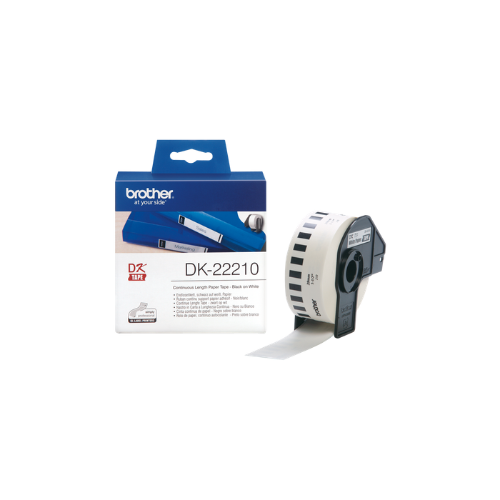
Brother DK-22210 compatible labels, 29mm x 30.48m, white
Key Features
Brand: Brother
Continuous Tape
Custom Size Labels,29mm x 30.48m
Material: white thermal paper
Roll to create custom size sticker labels
FAST DELIVERY
1 Year Warranty
Brother DK-22210 Compatible Continuous Paper Label Tape Review and Setup Guide
The Brother DK-22210 Compatible Continuous Paper Label Tape is a commercial-grade, narrow-format thermal labeling solution engineered for corporate office organization, retail pricing, barcode tracking, and custom filing systems. Designed to operate flawlessly with Brother QL series desktop thermal printers, this 29mm wide continuous roll allows users to customize label lengths to fit precise assets without wasting material. This comprehensive guide covers key product features, technical hardware specifications, and system installation steps
The Brother DK-22210 Compatible Continuous Paper Label Tape is a continuous-length paper roll engineered for clean desktop address routing, retail shelf pricing, and dynamic file folder indexing. Operating on direct thermal printing mechanics, this roll eliminates the need for expensive ink cartridges or toner replacements by using heat-activated chemical layers. It features a heavy-duty permanent acrylic adhesive backing and a pre-loaded plastic spool configuration that automatically triggers on-device software calibration. For a comprehensive overview, technical performance specifications, and troubleshooting steps, review the full guide below.
Premium Design and Key Features
Custom Length Drop-In Continuous Roll
Unlike pre-sized die-cut labels that lock you into static dimensions, this continuous roll format lets you choose your exact label length. The internal software calculates text widths and commands the printer’s automated steel blade assembly to slice the paper, allowing you to print a short file folder tab, a retail price label, or a long data barcode banner from the same roll.
Direct Thermal Response Mechanics
The media leverages high-grade, heat-sensitive paper film that changes color instantly when treated by the printer head elements. This direct thermal execution delivers crisp black lettering, dark high-contrast barcodes, and sharp logistics icons while removing the hassle of ink stains, ribbons, or toner maintenance
Permanent All-Surface Acrylic Adhesive
The underside of the paper stock is coated in a strong, permanent rubber-based acrylic adhesive matrix. It creates a fast, durable structural bond when applied to cardboard storage boxes, plastic organizational bins, smooth glass jars, metal asset frames, and office paper folders.
Integrated Smart Spool Alignment
The label roll comes mounted onto a dedicated black plastic structural spool assembly. This framework features a physical coding layout on its base bracket that interfaces with the printer sensors, allowing the machine to instantly detect the 29mm width profile and self-calibrate margins.
Technical Specifications
Model Reference: DK-22210 Compatible (Also designated as DK-2210)
Label Type: Continuous Length Paper Roll
Tape Width: 29 Millimeters (1.14 Inches) Narrow Layout Size
Roll Length: 30.48 Meters (100 Feet) of Total Printable Media
Visual Palette: Crisp Black Text on Bright White Matte Background
Material Base: Dura-Coated Direct Thermal Paper
Adhesive Matrix: Permanent All-Surface Structural Acrylic
Spool Hardware: Reusable Precision Guide Spool Included
Label Type: Continuous Length Paper Roll
Tape Width: 29 Millimeters (1.14 Inches) Narrow Layout Size
Roll Length: 30.48 Meters (100 Feet) of Total Printable Media
Visual Palette: Crisp Black Text on Bright White Matte Background
Material Base: Dura-Coated Direct Thermal Paper
Adhesive Matrix: Permanent All-Surface Structural Acrylic
Spool Hardware: Reusable Precision Guide Spool Included
Step-by-Step Installation Guide
Roll Loading and Alignment Check
- Turn off your Brother QL label printer and lift open the upper plastic media compartment cover lid.
- Remove any spent label spools or cardboard cores left inside the internal alignment bay slots.
- Slide the black plastic guide wing of the new DK-22210 compatible spool firmly down into the dedicated slot on the right side of the machine.
- Ensure the left side of the spool core seats flush against the opposite alignment wall channel.
- Thread the leading edge of the white label paper flatly underneath the internal rubber feed roller guides.
- Push the label tail forward until the front sensor detects the paper edge and triggers a brief automated alignment tug.
- Close the upper compartment cover lid securely and turn the printer power switch on.
- Press the physical Feed button once to advance the paper and clear out uneven leading edges cleanly.




































Reviews
There are no reviews yet.