

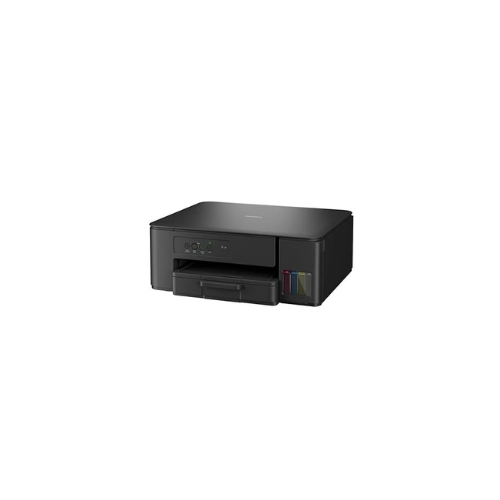
Brother DCP-T230 MFP Ink Tank Printer
Key Features
Brand:Brother
Connectivity Technology USB
Printing Technology Inkjet
Special Feature Auto Document Feeder
Colour black
Model Name DCP-T230
Printer Output Colour
Maximum Print Speed (Colour) 9 ppm
Max Print speed Monochrome 16 ppm
Item Weight 6 Kilograms
FAST DELIVERY
Brother DCP-T230 Ink Tank Multi-Function Printer Product Overview
The Brother DCP-T230 is an entry-level, three-in-one multi-function ink tank printer designed for home users, students, and small offices seeking ultra-low printing costs. This compact machine combines high-speed color printing, flatbed scanning, and standalone copying into a single footprint. Featuring a built-in refillable ink system, it eliminates the need for traditional, expensive ink cartridges while delivering reliable text and photo output.
High-Volume Printing and Cost Efficiency
The DCP-T230 is engineered to handle large print volumes while keeping operational costs minimal.
-
- High Yield Ink Bottles: The system uses affordable, high-capacity genuine Brother ink bottles. A single black ink bottle can print thousands of pages, dramatically lowering the cost per page.
- Refill Tank System: The built-in ink tanks are positioned at the front of the printer with a transparent cover, making it easy to monitor ink levels at a single glance without opening the machine.
Clean and Simple Maintenance
Brother has designed the refilling process to be mess-free and accessible for everyday consumers.
-
- No-Spill Bottle Design: The genuine ink bottles feature an optimized nozzle that minimizes accidental drips and spills during refills. You simply insert the bottle into the tank neck, and it stops filling automatically when full.
- Front-Access Panel: All four ink chambers (Cyan, Magenta, Yellow, Black) are easily accessible from the front of the machine, preventing the need to tilt or move the printer during maintenance.
Functional Performance and Paper Handling
-
- Versatile Media Support: The printer features a standard paper input tray that holds up to 150 sheets of plain paper, reducing the frequency of refills during long print runs.
- Flexible Printing Formats: It supports various paper sizes, including A4, Letter, Executive, A6, and photo indexes. A manual slot on the back handles thicker paper types or envelopes.
- Convenient Interface: Operates via a plug-and-play USB 2.0 connection directly to a Windows PC or Mac laptop, requiring zero network configuration.
Technical Specifications Summary
| Feature | Specification |
|---|---|
| Functions | Print, Scan, Copy |
| Printer Type | Inkjet Ink Tank System |
| Max Paper Size | A4, Letter |
| Paper Input Capacity | Up to 150 Sheets |
| Connectivity | Hi-Speed USB 2.0 (Wireless not supported) |
| Dimensions (W x D x H) | Approximately 435 mm x 359 mm x 159 mm |
| Weight | Approximately 6.4 kg |
Frequently Asked Questions
Does the Brother DCP-T230 support Wi-Fi or mobile printing?
No, the DCP-T230 is a strictly wired printer that connects to your computer via a standard USB cable. If you require wireless printing from smartphones or tablets, the Brother DCP-T420W or DCP-T520W are the recommended alternative models.
No, the DCP-T230 is a strictly wired printer that connects to your computer via a standard USB cable. If you require wireless printing from smartphones or tablets, the Brother DCP-T420W or DCP-T520W are the recommended alternative models.
Can this printer handle double-sided printing automatically?
No, this model supports manual duplex printing. The print driver will prompt you on your computer screen to flip the pages over manually to print on the second side.
No, this model supports manual duplex printing. The print driver will prompt you on your computer screen to flip the pages over manually to print on the second side.
What happens if I don’t use the printer for a long time?
Like all inkjet systems, ink can dry in the printhead nozzles if left idle for several weeks. To prevent clogging, keep the printer plugged into power; it will automatically run short, low-energy maintenance cleaning cycles periodically.
Like all inkjet systems, ink can dry in the printhead nozzles if left idle for several weeks. To prevent clogging, keep the printer plugged into power; it will automatically run short, low-energy maintenance cleaning cycles periodically.
Can I use third-party ink in the DCP-T230?
While third-party inks are physically available, using non-genuine ink can compromise print quality and potentially clog the fine printhead nozzles, which may void the manufacturer’s warranty. Genuine Brother ink is recommended for optimal longevity.
While third-party inks are physically available, using non-genuine ink can compromise print quality and potentially clog the fine printhead nozzles, which may void the manufacturer’s warranty. Genuine Brother ink is recommended for optimal longevity.
How do I make a quick photocopy without turning on my computer?
The printer features a dedicated physical control panel on the left side of the top lid. You can place your document on the scanner glass and simply press the “Mono Start” or “Color Start” button to make an instant copy.
The printer features a dedicated physical control panel on the left side of the top lid. You can place your document on the scanner glass and simply press the “Mono Start” or “Color Start” button to make an instant copy.




































Reviews
There are no reviews yet.