

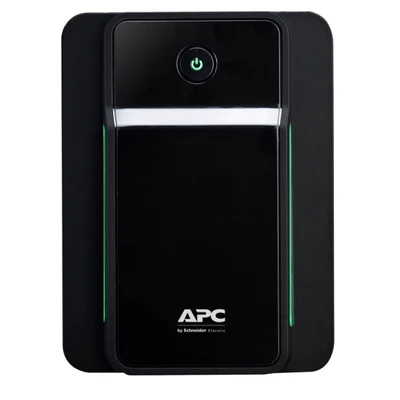

APC Back-UPS 750VA , 230V, AVR, IEC Sockets (BX750MI)
Key Features
Brand:APC
Capacity: 750VA/390Watts
Nominal Output Voltage: 230V
Waveform type: Stepped approximation to a sinewave
Surge protection
Automatic voltage regulation (AVR)
Interface Port(s): USB
Ultimate Guide to APC Back-UPS 750VA Line-Interactive UPS with IEC Sockets (BX750MI)
The APC Back-UPS 750VA (BX750MI) is a high-utility, tower-style power protection unit designed to shield home workstations, corporate computers, network hardware, and sensitive computing nodes from electrical anomalies [BV650I-MSX]. Featuring line-interactive topology, automatic voltage regulation (AVR), and industry-standard IEC outputs, this unit keeps your essential devices protected and powered during grid brownouts and blackouts It provides an excellent data-preservation framework for network-attached storage (NAS) boxes, security camera arrays, and performance desktop PCs [BV650I-MSX].
Key Features and Specifications
This tower backup system combines enterprise-style socket delivery with intelligent diagnostic monitoring.
-
- 750VA Power Footprint: Provisions up to 410 Watts of clean electrical energy to handle standard workstation demands.
- Automatic Voltage Regulation (AVR): Adjusts low-frequency voltage sags and high-voltage surges automatically without depleting battery reserves [
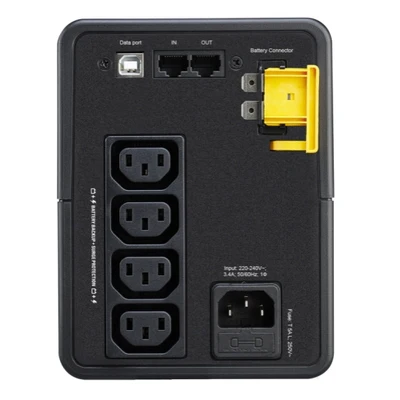
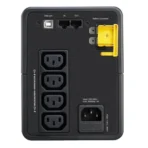
- Four Dedicated IEC C13 Outlets: Provides four battery-backed and surge-protected slots tailored for pro-grade computer equipment cords.
- PowerChute Serial/USB Communication: Connects with desktop computers to execute automated graceful system shutdowns during extended outages.
- 1Gbps Dataline Surge Protection: Screens telephone and high-speed network cables to block transient surges from blowing out motherboard Ethernet cards.
- Stealth Fanless Architecture: Operates silently under standard electrical load parameters to prevent desktop distractions.
- Cold-Start Functionality: Powers up attached communication hardware natively directly from the battery cells when the primary grid is down
Pro-Grade Connectivity and Clean Voltage Tracking
The BX750MI eliminates the hazard of corrupted file tables and blown hardware components caused by messy utility lines [BV650I-MSX]. Unlike generic power strips that simply cut to battery when the lights go out, this device features an intelligent built-in boost and trim transformer.
The hardware monitors incoming power phases constantly. If line voltage dips or swells, the transformer stabilizes the output to safe thresholds without using battery juice, preserving your battery runtime for actual blackout emergencies [BV650I-MSX].
Wired infrastructure safety is further enhanced by Gigabit-rated network shielding. Standard surges can travel up external data wires and slip past your power strip into your computer motherboard. The integrated RJ45 entry and exit slots loop your network feed through internal electrical blocks, filtering out rogue voltage lines instantly.
Comprehensive Device Management and Software Integration
The hardware interface features a dedicated data bridge designed to automate digital file preservation.
-
- Automated PowerChute Link: Intersects with Mac, Windows, and Linux operating systems via an attached USB interface cord to manage local hardware states.
- Graceful File Preservation: Commands your unattended office computers or server trays to save open files and shut down safely before the battery cells empty completely.
Step-by-Step Mechanical Installation and Initialization
Setting up your pro-grade battery backup system requires a few quick steps to activate the interior energy cells.
Battery Activation and Positioning
-
- Unpack the tower unit and stand it upright on a flat floor or shelf surface near your workspace
- Ensure there is ample air clearance around the casing ventilation slats to prevent heat buildup.
- Locate the red mechanical battery connector handle on the rear back panel of the chassis.
- Push the red connector block firmly inward and press it flush into the housing to lock the internal battery loop.
- Plug the main power input cord into a verified, grounded wall socket.
System Charging and Load Integration
-
- Leave the UPS connected to wall power for a full eight hours to let the internal cells reach peak charge depth before first use
- Connect your computer, monitor, or network router to the rear IEC C13 slots using standard IEC jumper cords.
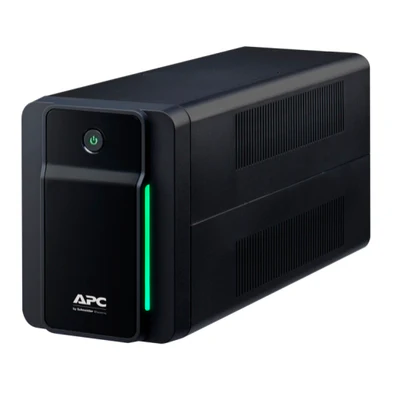
- Tap the physical power button on the front panel; the green status LED indicator will light up, confirming active filtering.
Frequently Asked Questions
What type of devices can I plug into the IEC sockets on this model?
The rear panel contains standard IEC C13 sockets, which are standard in corporate IT architecture. You can connect desktop computer towers, LCD monitors, network switches, and NAS arrays using standard IEC C13-to-C14 jumper cables. Avoid plugging household appliances, vacuums, or space heaters into these slots.
Can I plug a business laser printer into the APC BX750MI?
No, you must never connect heavy laser printers to standard desktop battery backup systems . Laser printers use high-energy fuser heating elements that draw massive spikes of electricity when initializing a print run. These sudden spikes will instantly breach the 410-Watt safety cap of this unit, triggering an overload shutdown.
How does the network data line surge protection affect my internet speeds?
The built-in network filtering data bays are fully optimized to handle high-speed 1Gbps (Gigabit) throughput matrices. Running your incoming modem or router Ethernet cable through these ports provides robust surge tracking without reducing your data transmission rates or increasing local ping latency.
How can I mute the audible battery alarms during home power cuts?
When the UPS shifts over to internal battery reserves, it will emit a repeating audible beep pattern to alert you. You can quickly silence these alerts by tapping the physical front-panel power button briefly, or configure custom mute parameters globally through the PowerChute software utility on your PC.




































Reviews
There are no reviews yet.