

Ultimate Guide to TP-Link N150 Wireless PCI Express Adapter TL-WN781ND
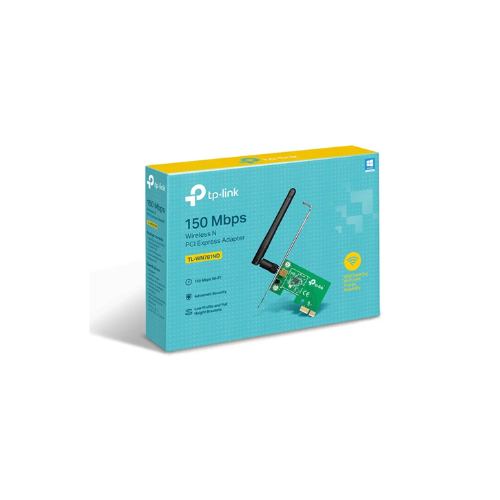
The TP-Link TL-WN781ND is an internal PCI Express wireless adapter designed to provide reliable desktop computer connectivity to a local network. Operating on the N150 standard, this card brings cost-effective wireless capabilities directly to your motherboard via a high-speed PCIe lane. It offers a solid, permanent option for desktop PCs that require basic internet access for emailing, text-based web browsing, and local file transfers without relying on messy USB attachments.
Key Features and Specifications
This internal hardware card focuses on backward compatibility, stable interface connectivity, and customizable antenna setups.
- PCI Express Interface: Utilizes a standard PCIe slot to establish a high-bandwidth motherboard link with zero port latency.
- N150 Wireless Performance: Delivers stable data transmission rates up to 150Mbps on the 2.4GHz frequency band.
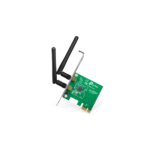
- Detachable Omni-Directional Antenna: Features a single external 2dBi antenna that can be unscrewed and replaced with a higher-gain model.
- Advanced Wireless Security: Deploys dependable WPA and WPA2 encryption standards to safeguard your data from unauthorized network snooping.
- WPS Quick Security Sync: Includes software-based Wi-Fi Protected Setup features to establish a secure link with a single click.
- Low-Profile and Full-Height Brackets: Ships with two separate structural brackets to ensure compatibility with standard or slim desktop cases.
- Legacy Compatibility: Integrates seamlessly with all older 802.11b and 802.11g network infrastructure hardware.
Motherboard Integration and Stable Operation
The primary advantage of the TL-WN781ND over external wireless USB keys is its direct connection to the motherboard. External USB adapters are susceptible to overheating during long sessions, accidental physical damage, and internal USB hub data delays.
By plugging directly into a PCI Express slot, this card gains a steady power supply and benefits from the interior cooling fans of your computer tower. This permanent interface ensures consistent network availability and reduces system lag compared to legacy peripheral adapters.
Detachable Antenna Architecture and Case Versatility
The physical layout of the card is engineered to fit into diverse office and home computing environments. The detachable 2dBi antenna connects via a standard RP-SMA threaded port on the back bracket. This allows users to easily unscrew the stock antenna and attach a high-gain replacement or an extension cable if the desktop case is blocked by a heavy metal desk.
Additionally, the dual-bracket retail bundle guarantees a perfect fit for any computer case. The card comes with a standard full-height bracket for typical gaming or home towers, but users can quickly swap it for the included low-profile bracket to mount the card inside slim business workstations.
Hardware Installation and Network Activation
Setting up an internal PCIe network card requires a quick physical installation inside your computer casing.
Physical Installation Steps
- Shut down your desktop computer and completely remove the main power cable from the wall.
- Unscrew the side panel of the computer case to access the internal motherboard components.
- Identify an open PCIe slot and remove the matching metal slot cover on the back panel of the case.
- Insert the TL-WN781ND card firmly into the motherboard slot until the card locks securely into position.
- Tighten the bracket screw to fix the card to the frame, reattach the side panel, screw the antenna onto the rear port, and power on your system.
Driver Setup Process
- Download the latest official device drivers from the TP-Link support website using an existing wired internet link or another device.
- Execute the installation wizard application as an administrator on your desktop operating system.
- Follow the quick onscreen prompts to complete the quick setup wizard and initialize the wireless chipset.
- Open your system network tray, choose your local Wi-Fi name, and input your security password to connect to the internet.
Frequently Asked Questions
Does the TP-Link TL-WN781ND support high-speed 5GHz Wi-Fi bands?
No, this adapter operates exclusively on the standard 2.4GHz frequency band. It is engineered to provide affordable, long-range wireless stability for everyday tasks rather than ultra-high-speed dual-band data transfers.
Is this internal wireless card compatible with Windows 11?
The hardware officially supports a wide range of operating systems, including Windows 10, 8, 7, and legacy Windows XP environments. For modern Windows 11 systems, you should check for updated community-tested drivers or use native Windows update plug-and-play drivers.
Can I upgrade the antenna to improve my wireless range?
Yes, the card uses a standard RP-SMA connector thread. You can unscrew the factory-issued 2dBi antenna and attach a higher-power antenna or an extended desktop antenna base to clear local furniture obstacles.
Why should I choose a PCIe card instead of a USB network adapter?
A PCIe card connects directly to the system motherboard bus, which offers better thermal dissipation and more reliable performance. It frees up your external USB ports for accessories and cannot be easily bumped or broken off like a protruding USB stick.




































Reviews
There are no reviews yet.