

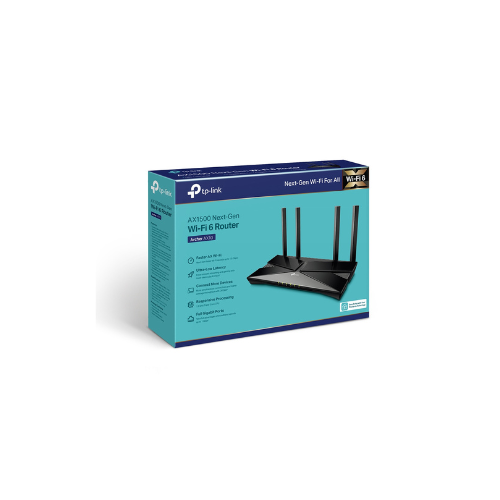
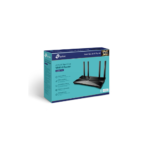
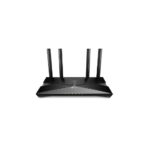
TP-Link Archer AX10 AX1500 Router Review: Next-Gen Wi-Fi 6 for Every Home
Are you struggling with slow internet speeds, lagging video conferences, or dropped connections when everyone in your home is online? As households add more smartphones, smart TVs, gaming consoles, and smart home appliances, older wireless networks quickly become congested and slow down. The TP-Link Archer AX10 AX1500 Wireless Dual Band Gigabit Router provides a powerful, affordable upgrade to solve this problem. Equipped with next-generation Wi-Fi 6 technology, this desktop router handles heavy network traffic with ease, ensuring a faster and more stable internet experience for your entire household.
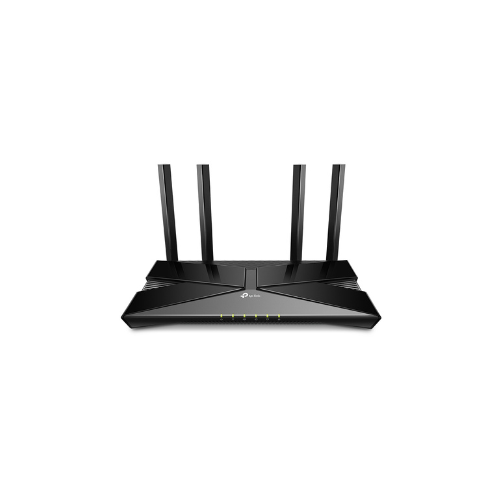
This advanced router upgrades your home connectivity by introducing state-of-the-art wireless standards designed for the modern internet. By organizing your data transmissions more efficiently, the device minimizes lag and stops network congestion before it starts. It features four high-gain external antennas that project a strong, reliable signal across your living space. Instead of dealing with random buffering wheels or dead zones in far corners of your home, this router blankets your environment in a high-speed data network. It easily supports simultaneous high-bandwidth tasks like 4K streaming, online gaming, and live video calling across multiple rooms.
Key Features of the TP-Link Archer AX10
Review the core technologies to see how this Wi-Fi 6 router upgrades your daily networking performance.
- Next-Gen Wi-Fi 6 Speeds: Delivers combined wireless speeds up to 1500Mbps, offering 1201Mbps on the 5GHz band and 300Mbps on the 2.4GHz band.
- OFDMA Efficient Transmission: Allows the router to transmit data to dozens of connected devices simultaneously in a single transmission burst, drastically reducing network lag
- Triple-Core Processing Power: Powered by a 1.5 GHz triple-core CPU that instantly routes massive amounts of data to eliminate latency
- MU-MIMO and Beamforming: Communicates with multiple devices at once while focusing wireless signal strength directly toward your hardware to expand overall coverage.
- Full Gigabit Ports: Features one gigabit WAN port and four gigabit LAN ports to extract maximum speeds from your high-speed fiber or cable internet plan.
Technical Specifications
Check the technical details to confirm compatibility with your home devices and internet subscription.
- Wireless Standards: IEEE 802.11ax ac n a 5GHz, IEEE 802.11n g b 2.4GHz
- Processor: 1.5 GHz Triple-Core CPU
- Antennas: 4 Fixed high-performance external antennas
- Ports: 1 Gigabit WAN Port, 4 Gigabit LAN Ports 10 100 1000Mbps
- Power Source: 12V 1A External power supply
- Wireless Security: WPA, WPA2, WPA3 advanced encryption protection
How to Set Up Your TP-Link Archer AX10 Router
Setting up your new Wi-Fi 6 network takes only a few minutes. You can complete the installation using a computer or your smartphone.
Method 1: Using a Web Browser
- Connect your internet modem to the blue WAN port on the back of the router using an Ethernet cable.
- Power on the router and connect your computer to one of the yellow LAN ports or link via the default Wi-Fi name printed on the bottom label.
- Open any web browser and navigate to tplinkwifi.net or 192.168.0.1 in the address bar.
- Create a unique administrator password to access the backend management page.
- Follow the step-by-step Quick Setup wizard to choose your internet connection type, customize your Wi-Fi names, and set secure passwords.
Method 2: Using the Tether App
- Connect the router WAN port to your modem and plug the device into a power outlet.
- Download the official TP Link Tether management application on your mobile phone.
- Open your smartphone settings and connect to the default TP Link Wi-Fi network.
- Launch the Tether app and select the Archer AX10 from the local device network list.
- Follow the guided on-screen prompts to configure your internet connection settings and save your custom security keys.




































Reviews
There are no reviews yet.