

TP-Link Archer C60 AC1350 Wireless Dual Band Router Review: High-Performance Home Wi-FI
Are you experiencing slow internet speeds, lagging online games, or dropped connections when multiple devices connect to your home network? As households add more smartphones, tablets, smart TVs, and laptops to their networks, an outdated or basic router can quickly become a bottleneck. The TP-Link Archer C60 AC1350 Wireless Dual Band Router provides an advanced, reliable, and cost-effective solution designed to handle heavy network traffic. This desktop router upgrades your home connectivity with faster dual-band speeds and advanced antenna technology to ensure a stable internet experience for the whole family.
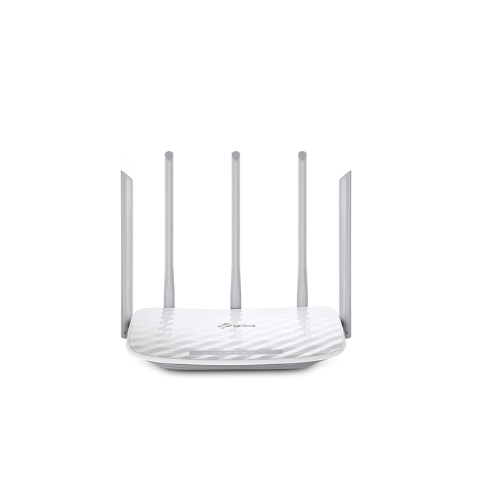
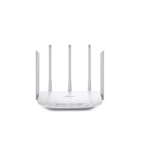
This high-performance router upgrades your entire home network by organizing your digital traffic into two dedicated highways. By separating everyday internet activities from high-bandwidth demands, the device minimizes interference and prevents data congestion. It features five distinctive external antennas strategically arranged to optimize the wireless signal across your living space. Instead of dealing with random connection drops or dead zones in far corners of your home, this router blankets your space in a clean, powerful wireless signal. It easily handles simultaneous tasks like smart home management, casual browsing, and heavy multimedia entertainment across multiple rooms.
Key Features of the Archer C60
Review the core capabilities to see how this dual-band router enhances your daily home networking experience.
- AC1350 Dual-Band Speeds: Delivers combined wireless speeds up to 1350Mbps, providing 867Mbps on the fast 5GHz band and 450Mbps on the reliable 2.4GHz band.
- Advanced Five Antenna Design: Features three 2.4GHz antennas and two 5GHz antennas arranged alternately to maximize coverage and reduce signal interference.
- MU-MIMO Technology: Allows the router to communicate with multiple compatible devices simultaneously, reducing wait times and increasing overall network efficiency
- Robust Parental Controls: Enables parents to manage internet access, block inappropriate content, and set daily time limits for connected children or guests.
- Guest Network Access: Creates a separate, secure wireless network for visitors, keeping your private home files and personal devices fully protected.
Technical Specifications TL-ARCHER C60
Check the technical details to confirm compatibility with your internet service provider and home hardware.
- Wireless Standards: IEEE 802.11ac n a 5GHz, IEEE 802.11n g b 2.4GHz
- Frequency: 2.4 GHz and 5 GHz dual band
- Antennas: 5 Fixed external antennas
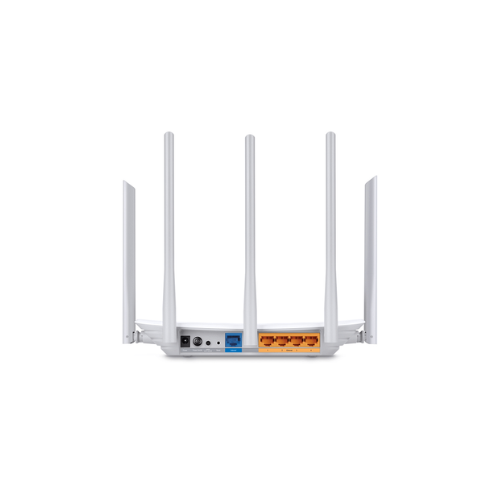
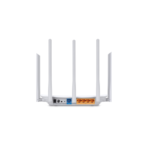
- Ports: 1 Fast WAN Port, 4 Fast LAN Ports 10 100Mbps
- Power Source: 12V 1A External power supply
- Wireless Security: WEP, WPA, WPA2, WPA PSK, and WPA2 PSK encryption
How to Set Up Your TP-Link Archer C60 Router
Setting up your new home network takes only a few simple steps. You can complete the process using a computer or a smartphone.
Method 1: Using a Web Browser
- Connect your internet modem to the blue WAN port on the back of the router using an Ethernet cable.
- Turn on the router and connect your computer to one of the yellow LAN ports or connect via the default Wi-Fi printed on the bottom label.
- Open a web browser and type tplinkreater.net or 192.168.0.1 in the address bar.
- Create a secure administrator password to log into the management page.
- Follow the Quick Setup wizard to select your internet connection type, customize your Wi-Fi names, and set your wireless passwords
Method 2: Using the Tether App ON TL-ARCHER C60
- Connect the router WAN port to your internet modem and power on both devices.
- Download the official TP Link Tether management application on your smartphone.
- Open your phone settings and connect to the default TP Link Wi-Fi network.
- Launch the Tether app and select the Archer C60 from the local device list.
- Follow the guided on-screen prompts to configure your internet connection and save your custom security settings.




































Reviews
There are no reviews yet.