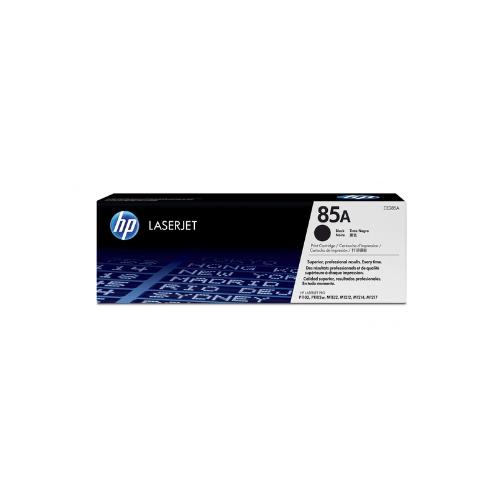
HP 85A Black Original LaserJet Toner Cartridge(CE285A)
Key Features
Brand: HP
Original HP 85A Toner Cartridges deliver legendary HP print quality.
>
HP 85 toner cartridges work with: HP LaserJet Pro P1102, P1109
>
1 Black (~1,600 pages)
>
Print high-quality black text and brilliant graphics with Original HP Supplies designed for reliability.
>
Produce bold, crisp text and sharp black-and-white graphics. Use HP LaserJet printers together with Original HP Toner Cartridges to achieve consistent, professional results.
>
Simplify your printing experience with reliable, easy-to-use printing and supplies management, plus convenient, free recycling.
>
Small business and home office users who want a great value for printing everyday business documents.
>
Depend on Original HP 85A Toner Cartridges designed specifically for your HP printer.
>
FAST DELIVERY
1 Year Warranty
Ultimate Guide to HP 85A Black Original LaserJet Toner Cartridge CE285A
The HP 85A Black Original LaserJet Toner Cartridge (CE285A) is a dependable, all-in-one print cartridge designed for legendary HP LaserJet Pro desktop printers. Featuring legendary spherical toner particles and an integrated hardware layout, this genuine cartridge ensures crisp text and professional grayscale graphics. It remains a popular networking choice for home offices, remote workers, and small business storefronts that demand daily reliability.
Key Features and Specifications
This original HP print supply combines core imaging parts into a single convenient unit to keep maintenance simple.
- Standard Yield Capacity: Prints approximately 1600 standard monochrome pages before requiring replacement.
- All-In-One Design: Houses the toner powder and the internal imaging drum together inside one physical cartridge shell.
- Spherical HP Toner Technology: Employs mathematically uniform toner particles to deliver sharp text and uniform gradients.
- Built-in Smart Chip Tracking: Communicates directly with your computer system to give accurate real-time volume alerts.
- Smear-Resistant Formula: Produces sharp black lines that resist fading and smudging over long archival storage periods.
- Instant-On Fusing Compatibility: Complements HP fast-printing features to deliver the first page out quickly from sleep mode.
All-In-One Construction and Maintenance Simplicity
The primary advantage of the HP 85A Cartridge is its user-friendly all-in-one design. Many modern laser systems separate the toner tube from the imaging drum, requiring users to track two separate replacement cycles.
This cartridge houses the toner reservoir, the developer roller, and the sensitive imaging drum inside one sturdy plastic frame. Every time you swap a depleted cartridge, you refresh the entire mechanical printing core of your machine, preventing hardware wear and ensuring continuous print quality without deep maintenance.
Premium Text Clarity and Contrast
Utilizing HP original spherical toner chemistry, the cartridge ensures crisp business documentation on every run. The uniform structure of each powder particle allows the printer to place the toner onto paper with extreme accuracy. This prevents random toner scattering, resulting in razor-sharp text characters and fine detail retention when printing complex charts, legal documents, or barcode shipping labels.
Quick Removal and Replacement Steps
Replacing your printer cartridge takes less than a minute and requires zero technical background.
Cartridge Replacement Process
- Open the main cartridge access door on the top panel of your LaserJet Pro machine.
- Grasp the integrated center handle of the old HP 85A cartridge and pull it firmly up and out of the internal track.
- Unpack the new cartridge from its protective cardboard box and remove the orange plastic clips.
- Pull the orange plastic tab straight out horizontally from the side of the cartridge to remove the internal sealing tape entirely.
- Rock the cartridge gently back and forth five or six times to distribute the micro-fine toner powder evenly inside.
- Align the cartridge guide arrows with the internal tracks of the machine, slide it down until it drops into place, and close the top door.
Frequently Asked Questions
Which specific printers are compatible with the HP 85A toner?
The cartridge is engineered to function with the HP LaserJet Pro P1102 series, P1109 series, and the multi-function MFP M1212, M1214, M1217, and M1132 series. Always double-check your printer model number before purchase to ensure a correct fit.
Do I need to buy a separate imaging drum for this model?
No, a separate imaging drum is not required. The imaging drum is built directly into the core chassis of the HP 85A cartridge shell, meaning you replace the entire drum system automatically with every standard toner swap.
What should I do if the printer output starts turning faint?
If your toner levels are low but not empty, remove the cartridge from the machine and rock it gently back and forth horizontally. This shifting redistributes the remaining powder inside the reservoir, allowing you to extract a few more clear pages while a replacement arrives.
Can I recycle my empty HP 85A cartridge?
Yes, HP includes a free recycling program with their genuine supplies. You can use the pre-paid shipping label provided inside the retail box to mail your empty plastic casing back to the HP Planet Partners recycling facility.






































Reviews
There are no reviews yet.