

Ultimate Guide to TP-Link Archer T3U AC1300 Mini Wireless MU-MIMO USB Adapter
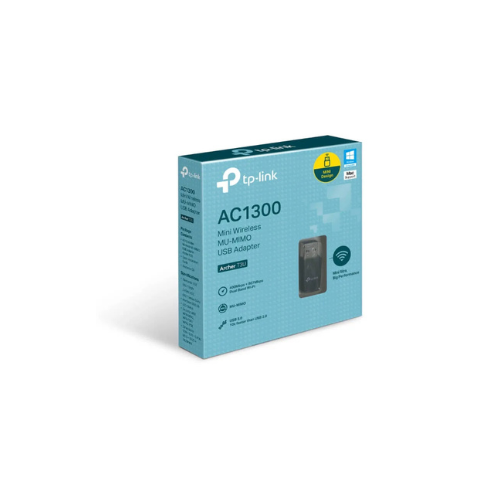
The TP-Link Archer T3U is a high-speed, pocket-sized wireless network adapter designed to upgrade your laptop or desktop computer to fast Wi-Fi 5 performance. Operating on the AC1300 standard, this mini USB device delivers dual-band connectivity with advanced data-handling capabilities. It offers a reliable and portable solution to boost your internet speeds for data-heavy tasks like high-definition streaming, online gaming, and large file downloads.
Key Features and Specifications
This compact adapter packs advanced internal antenna design and fast data ports into a highly portable frame
- AC1300 Dual-Band Performance: Achieves speeds up to 867Mbps on the 5GHz band and 400Mbps on the 2.4GHz band.
- USB 3.0 Interface: Provides data transfer speeds up to 10 times faster than older USB 2.0 connections to eliminate bottlenecks.
- MU-MIMO Technology: Establishes multiple simultaneous data streams to improve overall network throughput and efficiency.
- Miniature Form Factor: Features a sleek, low-profile design that avoids blocking adjacent USB ports on your computer.
- Advanced WPA2 Security: Deploys reliable wireless encryption protocols to safeguard your local connection against unauthorized tracking.
- Dual High-Gain Antennas: Utilizes internal high-performance antennas to expand signal reception range and maintain link stability.
High-Speed Dual-Band Output and USB 3.0 Advantage
The Archer T3U overcomes common wireless slowdowns by pairing dual-band technology with a high-speed USB 3.0 port. Users can shift demanding online tasks like video conferencing and HD media streaming to the clearer 5GHz band. For standard webpage browsing, background emails, and smart home background tasks, the far-reaching 2.4GHz band provides steady coverage.
The inclusion of a USB 3.0 interface ensures the adapter can handle these high wireless speeds. Older USB 2.0 ports cap transfer rates, but the upgraded USB 3.0 standard allows data to flow freely between your computer and the adapter without hardware lag.
Improved Efficiency via MU-MIMO Technology
By incorporating MU-MIMO architecture, the adapter shifts how your computer interacts with your home router. Traditional wireless cards communicate with routers sequentially, forcing devices to wait their turn and causing brief stutters. When paired with a compatible MU-MIMO router, this device establishes two concurrent data streams, lowering network latency and sustaining reliable download speeds even when other household members are online.
Driver Installation and Configuration Steps
Bringing your target machine online takes only a few quick moments using standard installation procedures.
Driver Setup Process
- Insert the mini adapter into an available USB 3.0 slot on your computer tower or laptop frame.
- Download the latest device drivers from the official TP-Link support website using an existing internet link.
- Launch the setup program as an administrator on your operating system.
- Follow the quick onscreen prompts to complete the quick installation wizard.
- Restart your computer if prompted by the setup software to finalize the new hardware configurations.
Connecting to the Network
- Click on the wireless network icon located within your system taskbar.
- Select your local router network identifier from the populated list of available Wi-Fi names.
- Input the corresponding password credentials to authenticate your connection and access the internet.
Frequently Asked Questions
Can the TP-Link Archer T3U fit into a standard USB 2.0 port?
Yes, the adapter is fully backward compatible with older USB 2.0 slots. However, using a USB 2.0 port will restrict the maximum transmission speed, so plugging it into a blue USB 3.0 port is highly recommended for best performance.
Which operating systems are officially compatible with this adapter?
The hardware provides dedicated driver support for modern Windows operating systems, including Windows 11, 10, 8.1, 8, and 7. It also features official software support for various macOS distributions ranging from version 10.15 down to 10.9.
What is the advantage of the Mini design over standard Nano adapters?
While Nano adapters are smaller, they must compromise on internal antenna size. The Mini design is slightly larger but houses advanced dual-antenna components and MU-MIMO chips, offering much faster speeds and better range while remaining highly portable.
Do I need to disable my laptop’s built-in Wi-Fi to use this device?
Yes, disabling your computer’s built-in legacy wireless card via the Device Manager interface is highly recommended. This prevents internal hardware address conflicts and ensures your operating system prioritizes the faster Archer T3U adapter.




































Reviews
There are no reviews yet.