

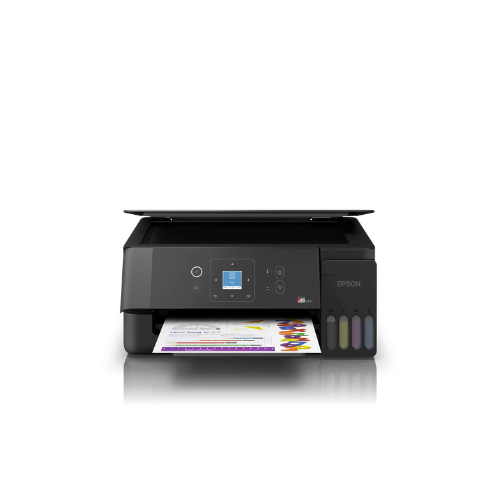
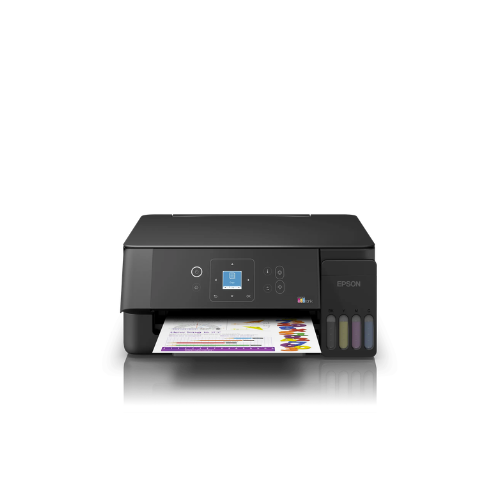
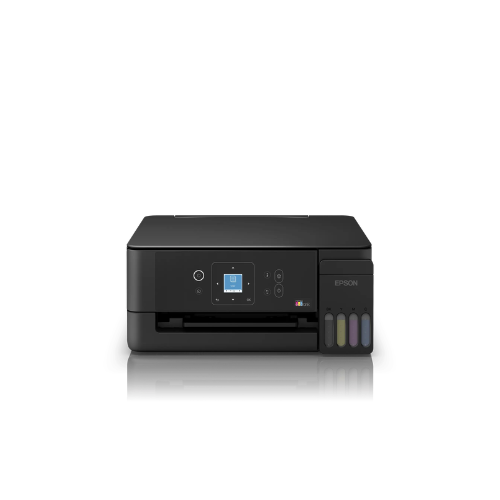
Epson EcoTank L3360 A4 WI-FI Printer-C11CL63412
Key Features
Brand: Epson
Number of colours
4 colour
Printing Speed ISO/IEC 24734
11 pages/min Monochrome, 6 pages/min Colour, 69 Seconds per 10 x 15 cm photo
Printing Speed
33 pages/min Monochrome (plain paper 75 g/m²), 15 pages/min Colour (plain paper 75 g/m²), 27 Seconds per 10 x 15 cm photo (Epson Premium Glossy Photo Paper)
First Page Out
Monochrome10 Seconds, Colour16 Seconds
Colours
Black [Dye], Cyan [Dye], Yellow [Dye], Magenta [Dye]
Colours Capacity
Black [65ml], Cyan [65ml], Yellow [65ml], Magenta [65ml]
FAST DELIVERY
1 Year Warranty
Epson EcoTank L3360 A4 Wi-Fi Printer Technical Guide
The Epson EcoTank L3360 A4 Wi-Fi Printer (SKU: C11CL63412) is a multi-function, cartridge-free ink tank workstation engineered to deliver exceptional cost efficiency, reliable wireless connectivity, and high-quality A4 printing for modern home offices, students, and small business workspaces. Featuring an integrated ink tank system, smart mobile setup controls, and low-cost replacement bottles, this device provides a seamless and sustainable printing ecosystem. This comprehensive guide covers key product features, core technical specifications, and system initialization steps
The Epson EcoTank L3360 operates as an all-in-one print, copy, and scan solution optimized for high-volume, cost-effective documentation and vivid color imaging. Utilizing advanced Heat-Free piezo printing mechanics, the system dramatically lowers electrical consumption compared to traditional laser alternatives while eliminating the maintenance cycle of waste-heavy disposable cartridges. It features specialized Key-Lock mechanical bottle nozzles to prevent cross-color filling errors and built-in Smart Panel wireless synchronization. For a comprehensive overview, technical performance specifications, and troubleshooting steps, review the full guide below.
Premium Design and Key Features
Ultra-Low-Cost Cartridge-Free EcoTank System
The printer incorporates a front-facing, integrated high-capacity ink reservoir array that completely eliminates the need for expensive, wasteful plastic cartridges. A single set of high-yield ink bottles can print thousands of monochrome pages and vibrant color layouts, driving down the overall total cost of ownership to a fraction of a cent per page.
Epson Heat-Free Printing Technology
Leveraging advanced Micro Piezo printhead mechanics, the system ejects ink through precise mechanical pressure rather than thermal heat application. This design ensures instant-on printing capabilities with zero warm-up delays, maintains consistent pixel dot precision, and significantly extends the operational lifespan of the internal hardware components.
Spill-Free Key-Lock Bottle Refilling
The front-facing ink tanks feature transparent tracking windows to let users monitor remaining levels at a glance. The matching replacement ink bottles are engineered with unique mechanical key-slotted nozzles that fit only into their corresponding color chambers, ensuring a completely mess-free, automatic fill-stop process.
Intelligent Wireless Mobile Connectivity
Equipped with built-in Wi-Fi and Wi-Fi Direct protocols, the printer effortlessly links with local office routers, laptops, smartphones, and tablets. Through the official Epson Smart Panel mobile application, users can easily execute wireless printing tasks, modify paper layouts, scan files directly to cloud storage, and perform remote printhead maintenance actions.
Technical Specifications
- Product Identification: Epson EcoTank L3360 (Part Number: C11CL63412)
- Product Class: Multi-Function A4 Color Ink Tank Printer (Print, Copy, Scan)
- Print Engine: Epson Micro Piezo Heat-Free Technology
- Nozzle Layout: 180 Black Nozzles, 59 Nozzles Per Color (Cyan, Magenta, Yellow)
- Maximum Resolution: Up to 5760 x 1440 Optimized Dots Per Inch (DPI)
- Print Speed (ISO): Up to 15.0 Pages Per Minute (Monochrome), 8.0 Pages Per Minute (Color)
- Media Handling Size: A4, A5, A6, B5, Legal, Letter, Envelopes, Custom (Up to 1200mm length)
- Paper Input Capacity: 100 Sheets of Standard Plain Paper, 20 Sheets of Premium Glossy Photo Paper
- Scanner Assembly: Flatbed CIS Color Image Sensor with up to 1200 x 2400 Optical DPI
- Interface Ports: High-Speed USB 2.0, Wi-Fi IEEE 802.11b/g/n, Wi-Fi Direct
- Consumable Matrix: Epson 003 High-Yield Ink Bottle Series (Black, Cyan, Magenta, Yellow)
Step-by-Step Initial Setup Guide
Unboxing, Ink Filling, and Hardware Priming
- Carefully lift the printer out of its shipping box, place it onto a flat, level surface, and remove all protective bright blue transit tape strips.
- Flip open the main ink tank compartment cover on the front right flank of the printer chassis.
- Take the Black ink bottle, unscrew the plastic cap, and invert it straight onto the matching black tank intake port (do not squeeze the bottle; it will fill and stop automatically).
- Repeat the identical key-slotted filling process for the remaining Cyan, Magenta, and Yellow ink chambers, then securely snap the compartment covers closed.
- Insert the main AC power cord into the rear socket of the printer and plug it directly into a wall outlet.
- Push the physical Power button; once the power LED stops flashing and stays solid, press and hold the triangular Stop/Maintenance button for exactly 5 seconds.
- The printer will illuminate its indicator lights and begin a loud internal fluid charging cycle, which takes roughly 10 minutes to pump ink completely through the internal tubes into the printhead (do not turn off the power during this automated initialization phase).




































Reviews
There are no reviews yet.