

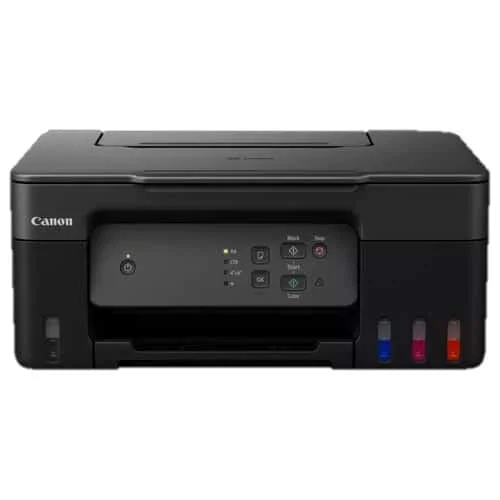
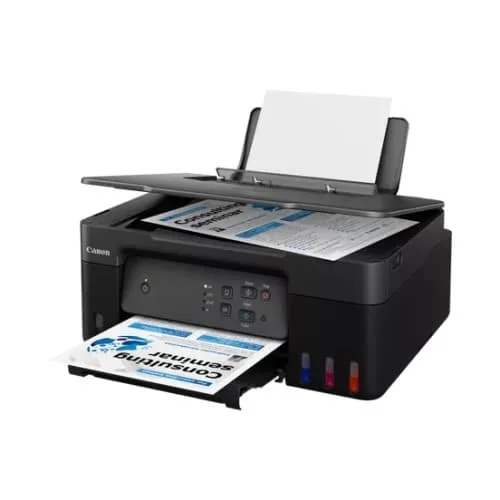
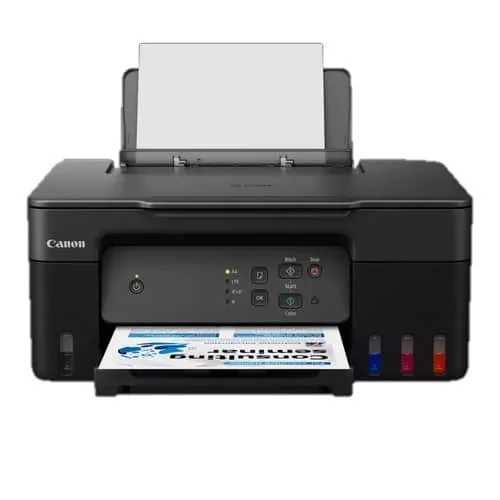
Canon Pixma G3430 AIO Colour Inkjet Printer
Key Features
Brand:Canon
11.0 ipm / 6.0 ipm
High quality printing
3-in-1 printer
100-sheet capacity
Mac, Windows and Chrome
Canon Pixma G3430 AIO Colour Inkjet Printer Technical Guide
The Canon Pixma G3430 is a multi-function, refillable MegaTank ink inkjet printer engineered to deliver exceptional cost efficiency, reliable wireless connectivity, and high-quality borderless printing for modern home offices, students, and small business workspaces. Featuring integrated front-facing ink tanks, smart mobile app controls, and low-cost replacement bottles, this device provides a seamless and sustainable printing ecosystem. This comprehensive guide covers key product features, core technical specifications, and system initialization steps.
The Canon Pixma G3430 operates as an all-in-one print, copy, and scan solution optimized for high-volume, cost-effective documentation and vivid color photo imaging. Utilizing advanced hybrid ink mechanics (pigment black for crisp text, dye-based colors for vibrant graphics), the system delivers sharp outputs while eliminating the maintenance cycle of waste-heavy disposable cartridges. It features specialized mechanical bottle nozzles to prevent cross-color filling errors and built-in Canon PRINT app wireless synchronization. For a comprehensive overview, technical performance specifications, and troubleshooting steps, review the full guide below.
Premium Design and Key Features
Ultra-Low-Cost Refillable MegaTank System
The printer incorporates a front-facing, integrated high-capacity ink reservoir array that completely eliminates the need for expensive, wasteful plastic cartridges. A single set of high-yield ink bottles can print up to 6,000 monochrome pages (7,600 in Economy mode) and 7,700 vibrant color layouts, driving down the overall total cost of ownership to a fraction of a cent per page.
Hybrid Ink Printing Technology
Leveraging Canon’s FINE printhead mechanics, the system deploys pigment black ink alongside dye-based color inks. This combination ensures that corporate text documents remain entirely smudge-proof and sharp, while color images and borderless photographs retain smooth gradients and rich color transitions.
Spill-Free Color-Coded Bottle Refilling
The front-facing ink tanks feature clear windows to let users monitor remaining levels at a glance. The matching replacement ink bottles are engineered with unique mechanical key-slotted nozzles that fit only into their corresponding color chambers, ensuring a completely mess-free, automatic fill-stop process.
Intelligent Wireless Mobile Connectivity
Equipped with built-in Wi-Fi and Wi-Fi Direct protocols, the printer effortlessly links with local office routers, laptops, smartphones, and tablets. Through the official Canon PRINT mobile application, Apple AirPrint, and Mopria for Android, users can easily execute wireless printing tasks, modify paper layouts, scan files directly to local storage, and perform remote printhead maintenance actions
Technical Specifications
-
- Product Class: Multi-Function Color MegaTank Printer (Print, Copy, Scan)
- Print Engine: Canon FINE Printhead Technology (Refillable Ink Tanks)
- Print Resolution: Up to 4800 x 1200 Optimized Dots Per Inch (DPI)
- Print Speed (ISO): Up to 11.0 Images Per Minute (Monochrome), 6.0 Images Per Minute (Color)
- Borderless Printing: Yes, supports sizes up to A4, Letter, 4″x6″, 5″x7″, 7″x10″, 8″x10″
- Media Handling Size: A4, A5, A6, B5, LTR, LGL, Envelopes, Cardstock, Custom (Up to 1200mm length)
- Paper Input Capacity: Rear Feed Tray supporting up to 100 Sheets of Standard Plain Paper
- Scanner Assembly: Flatbed CIS Color Image Sensor with up to 600 x 1200 Optical DPI
- Interface Ports: High-Speed USB (Type-B Port), Wi-Fi IEEE 802.11b/g/n, Wi-Fi Direct
- Consumable Matrix: Canon GI-41 High-Yield Ink Bottle Series (Black, Cyan, Magenta, Yellow)
- Maintenance Cartridge: User-replaceable MC-G04 block reduces service center reliance
Step-by-Step Initial Setup Guide
Unboxing, Ink Filling, and Hardware Priming
- Carefully lift the printer out of its shipping box, place it onto a flat, level surface, and remove all protective bright orange transit tape strips.
- Flip open the main scanner unit bed cover to access the internal alignment carriage bay, and lift the ink tank caps on the left and right flanks.
- Take the Black ink bottle, unscrew the plastic cap, and invert it straight onto the matching black tank intake port (do not squeeze the bottle; it will fill and stop automatically).
- Repeat the identical key-slotted filling process for the remaining Cyan, Magenta, and Yellow ink chambers, then securely snap the rubber compartment covers closed.
- Insert the dual FINE printhead cartridges (Black marked ‘B’ and Color marked ‘C’) into their corresponding slots in the central carriage block, snapping the plastic locking bracket down firmly.




































Reviews
There are no reviews yet.